
Google Search Console Extractor
Pulling data from Google Search Console
Connect your Google Search Console account to sync search performance data into your managed data lake.
Prerequisites:
- You'll need access to a Google Search Console account with verified sites.
- The Google Search Console API must be enabled in your Google Cloud Console.
- Users need Admin workspace permissions to add integrations. Learn more about extractor integrations.
Setup
Go to this link to add an integration. Search for Google Search Console and click it to open the creation form.
Give your integration an easily identifiable name (e.g., Google Search Console).
Enter the site URLs you want to sync, separated by commas. You can use domain-level properties by prefixing with sc-domain: (e.g., sc-domain:example.com). URL-prefix properties use the full URL (e.g., https://www.example.com/).
Select DuckLake as your Destination Integration to send data to your managed data lake, then enter the Dest Schema name (e.g., GOOGLESEARCHCONSOLE).
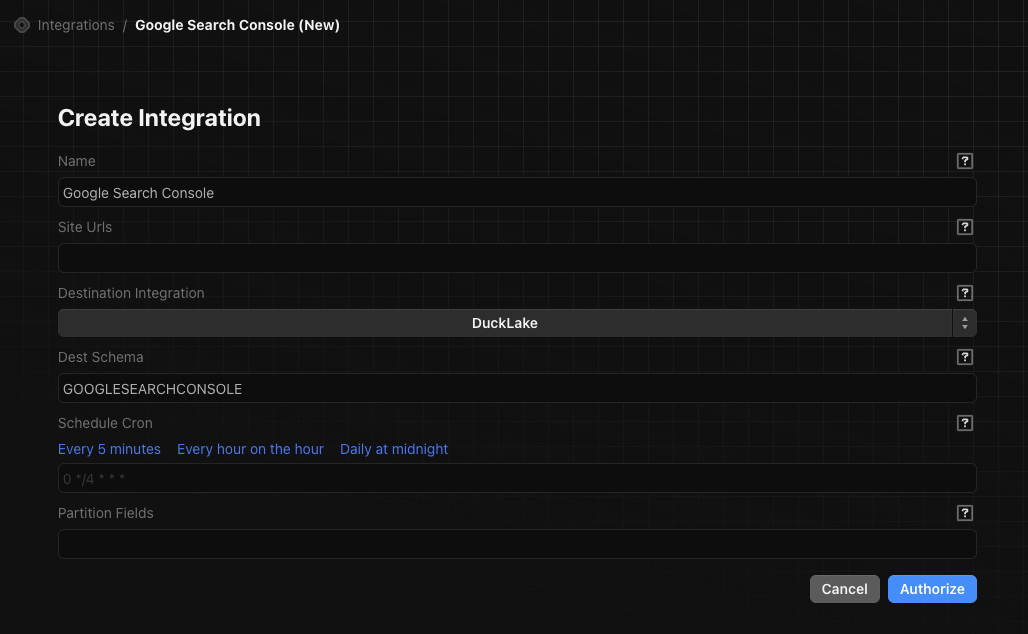
Enter a cron expression for how often the integration runs. Use the preset links or write your own. Examples:
- Every hour:
0 * * * * - Daily at midnight:
0 0 * * *
Click Authorize. You'll be redirected to Google to sign in and grant Definite access to your Search Console data. After completing the OAuth flow, you'll be brought back to Definite and the integration will be created.