


HubSpot Data Warehouse: Setup, Tools, and What to Build First
Your board asks "Which channels actually produce revenue?" and the honest answer is: you can't pull that from HubSpot. Not without exporting deals into a spreadsheet, matching them against Stripe charges by email, and manually joining everything in Google Sheets while praying the formulas hold. When investors dig in on those numbers, they're evaluating your investor-ready reporting layer.
A HubSpot data warehouse is an external database that pulls CRM data out of HubSpot so you can join it with billing, product, marketing, and support data in one queryable place. Instead of answering cross-system questions with CSV exports, you write a query — or ask an AI — and get an answer that's current, repeatable, and trustworthy. One team we work with connected HubSpot and Stripe on a Monday, had a forecast-vs-actual revenue dashboard live by Wednesday, and shared it at their board meeting that Friday.
This guide covers why HubSpot's native reporting hits a wall, how to connect HubSpot to a warehouse in minutes, how the main tools compare, and what to build first. If you're still deciding whether to move off native reporting at all, the decision framework for when to optimize, connect, or replace is worth reading first. If your plan is to hand-assemble Snowflake + Fivetran + dbt + BI, read why multi-vendor stack builds stall before you sign four contracts.
Why Connect HubSpot to a Data Warehouse?
HubSpot is excellent at what it does: managing contacts, tracking deals, running sequences, and reporting on activity inside HubSpot. The problem starts when the questions go beyond one system.
Cross-system questions are the ones that matter. "What's our true CAC by channel?" needs HubSpot leads joined with GA4 sessions and Stripe payments. "Which customers are likely to churn?" needs CRM lifecycle data joined with product usage and support tickets. "Why doesn't our forecast match actual revenue?" needs HubSpot deal amounts compared against Stripe subscription charges. None of these are answerable inside HubSpot alone.
Native reporting has structural limits. HubSpot's report builder works within HubSpot's data model. You can't calculate cohort retention, build multi-touch attribution that spans GA4 and your product database, or compute "days from signup to activation" when activation happens outside HubSpot. Custom reports require Professional ($890/mo). Custom objects require Enterprise ($3,600/mo). Even then, you're still analyzing within HubSpot's walls.
Seat costs gate access. When your finance team, your CEO, and your marketing director all need to see pipeline data alongside revenue and product metrics, you're not buying everyone a HubSpot seat just to view a dashboard. A warehouse makes data accessible to anyone with a browser.
A data warehouse solves this by pulling HubSpot data out — alongside Stripe, your product database, GA4, and everything else — so all your sources are queryable in one place.
HubSpot Data Hub vs. an External Warehouse
HubSpot recently launched Data Hub, which includes warehouse connectors (Snowflake, Databricks) and Reverse ETL capabilities. It's worth understanding when Data Hub makes sense versus an external warehouse.
Data Hub is built for bringing external data into HubSpot. It excels at syncing warehouse data back into CRM records — enriching contacts with product usage scores, syncing billing status from Stripe, or pushing calculated fields into HubSpot properties for workflow automation. If your primary goal is making HubSpot smarter with external data, Data Hub is a reasonable option.
An external warehouse is built for analytics across all your systems. If you need dashboards that join HubSpot with five other sources, governed metrics that everyone agrees on, SQL access for ad-hoc analysis, or an AI analyst that can answer "what's our NRR by cohort?" — you need data flowing out of HubSpot into an analytical layer. Data Hub doesn't replace that.
The bidirectional play. The most effective setup does both: warehouse HubSpot data for cross-system analytics, and sync calculated insights back into HubSpot for operational workflows. Health scores, churn risk flags, expansion signals — computed in the warehouse, pushed back to HubSpot so your team can act on them. (Our HubSpot RevOps data automation guide walks through this pattern in detail.)
How to Connect HubSpot to a Data Warehouse
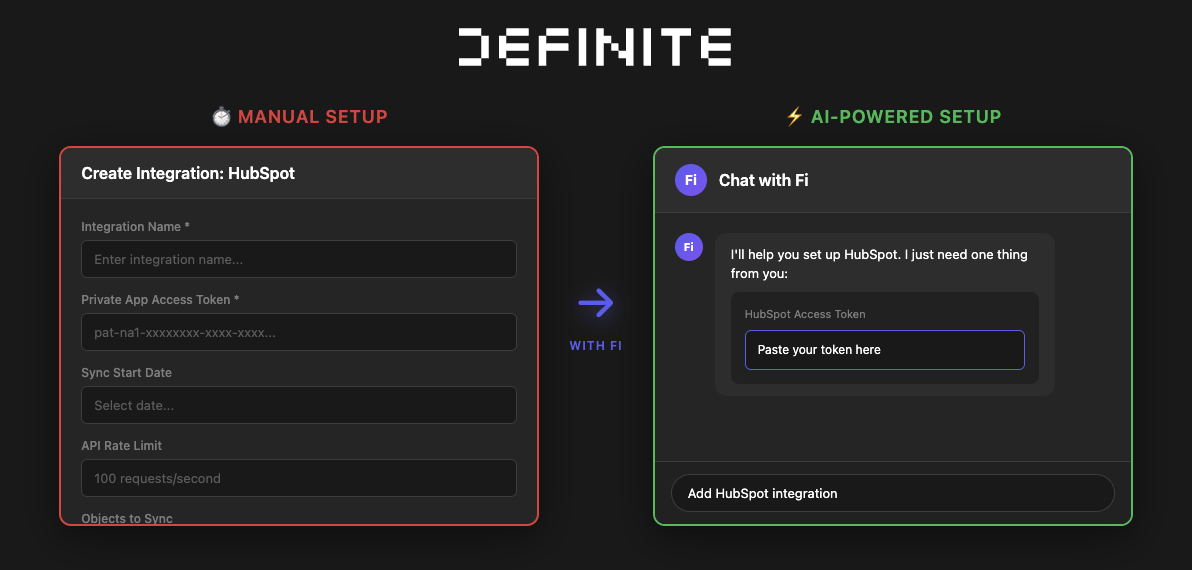
In Definite, you can connect HubSpot to your data warehouse just by asking Fi, the AI analyst. No configuration forms, no pipeline code.
Step 1: Ask Fi to Add HubSpot
From anywhere in Definite, say something like:
"Add HubSpot integration"
Fi launches its onboarding skill and handles the setup for you.
Step 2: Enter Your Access Token
HubSpot uses a private access token for authentication. Fi shows you exactly what you need and provides clear documentation on how to generate the token. Paste it in and submit.
Step 3: Start Using Your Data
Fi confirms the integration is set up and your HubSpot data starts syncing into your warehouse. Contacts, companies, deals, engagements, pipelines, tickets, line items, and custom objects all land as queryable tables — no schema design needed.
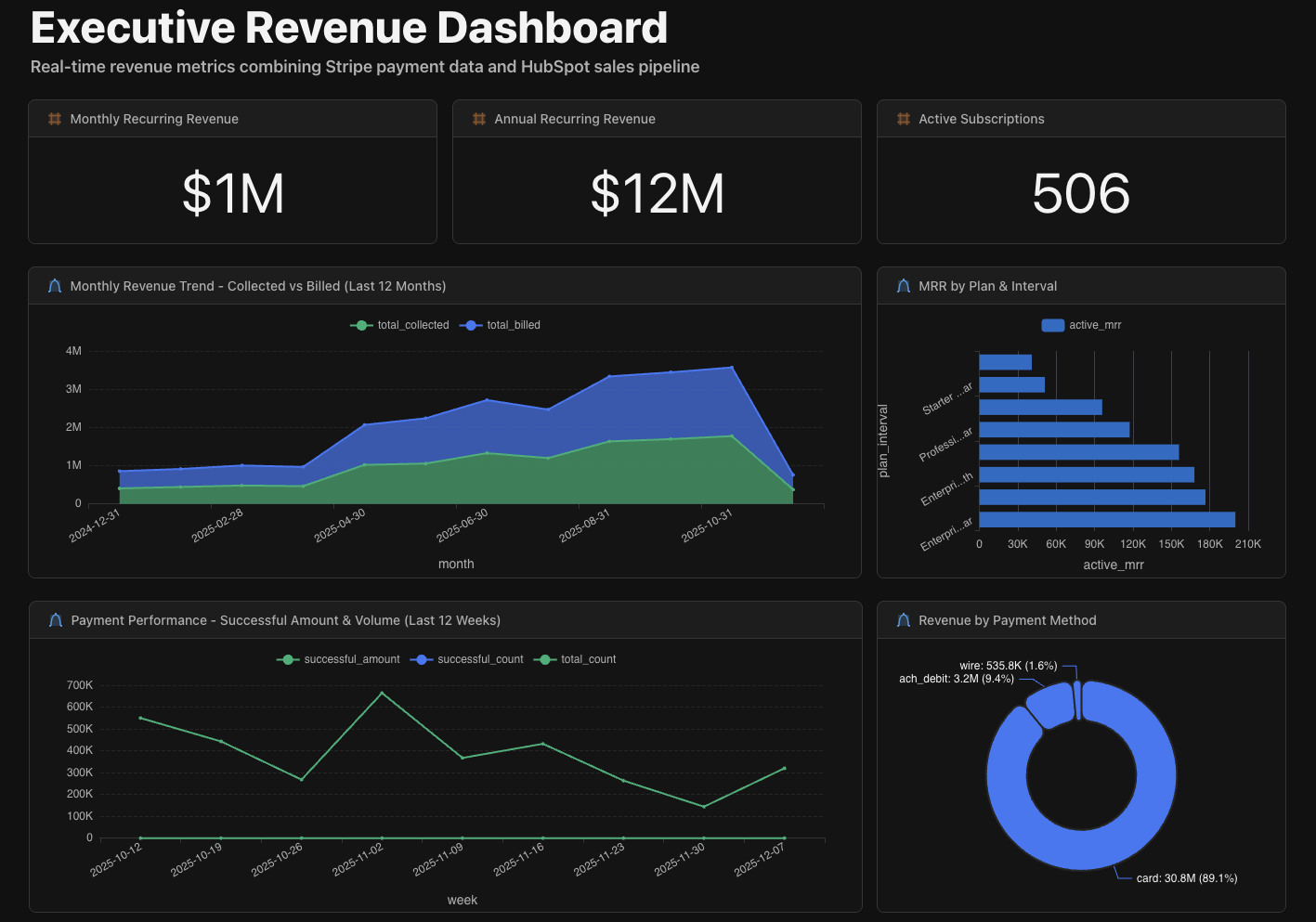
Once data is flowing, you can query it immediately with SQL or ask Fi in plain English. For example:
SELECT
  d.deal_name,
  d.amount,
  d.close_date,
  c.company_name,
  d.pipeline
FROM hubspot.deals d
JOIN hubspot.companies c ON d.company_id = c.company_id
WHERE d.deal_stage = 'closedwon'
  AND d.close_date >= '2026-01-01'
ORDER BY d.amount DESC
Or just ask Fi: "Which deals closed in Q1 and what was the total by pipeline?"
Under the hood, data lands in a managed warehouse built on DuckDB with open formats (Iceberg/Parquet) — so there's full SQL access, no vendor lock-in, and you can export everything if you ever need to. Metric definitions live in a governed semantic layer powered by Cube.dev, so "revenue" means the same thing in every dashboard and query.
What You Can Do After Connecting
| Action | What It Does |
|---|---|
| Sync to Data Warehouse | Store contacts, deals, companies, and activities in your warehouse |
| Build Dashboards | Create custom reports combining CRM data with other sources |
| Ask Fi Questions | Query your HubSpot data in plain English — no SQL required |
| Join with Other Data | Combine with Stripe, Postgres, Google Sheets, and 500+ other sources |
| Sync Back to HubSpot | Push calculated fields (health scores, LTV, churn risk) back into HubSpot properties |
Definite vs. Datawarehouse.io vs. DIY Stack
Three realistic options for warehousing HubSpot data, each built for a different situation.
| Datawarehouse.io | DIY Stack (Fivetran + Snowflake + Tableau) | Definite | |
|---|---|---|---|
| What it does | ETL from HubSpot into your existing database | Full pipeline: extract, store, transform, visualize | All-in-one: ingest, warehouse, model, dashboard, AI |
| Pricing | From $79/mo (Database Sync) | ~$3,200-7,100/mo (tools only) | Free tier; $250/mo Platform tier |
| Warehouse included? | No — you bring your own (Postgres, BigQuery, Redshift, SQL Server) | Yes (Snowflake/BigQuery — billed separately) | Yes — managed, no configuration |
| BI / dashboards included? | No — you bring Tableau, Power BI, etc. (BI connectors from $139/mo extra) | Yes (Tableau — billed separately) | Yes — built-in dashboards + AI analyst |
| Reverse sync to HubSpot? | No | With additional tooling (Census, Hightouch) | Yes — push calculated fields back automatically |
| Other data sources? | HubSpot only | 500+ (via Fivetran) | 500+ connectors — HubSpot, Stripe, Postgres, GA4, and more |
| Setup time | Hours (if you have a database ready) | 3–6 months | 1–2 days to first dashboard |
| Engineering required? | Moderate — you manage the database, schema, and BI layer | Significant — pipeline maintenance, model writing, query optimization | Works for technical and non-technical users — full SQL when you need it, drag-and-drop when you don't |
When Each Option Makes Sense
Datawarehouse.io is purpose-built for HubSpot and does one thing well: getting HubSpot data into an external database. If you already have a warehouse and a BI tool and just need to add HubSpot as a source, it's affordable and reliable. The limitation is that it's HubSpot-only — when you need to add Stripe, GA4, or your product database, you're back to assembling separate connectors. And you still need to bring your own warehouse, your own BI layer, and the expertise to connect them.
The DIY stack (Fivetran + Snowflake + dbt + Tableau) gives you maximum control and flexibility. It's the right choice for teams with a data engineer on staff who want to customize every layer. The tradeoff is cost ($3,200-7,100/mo for tools alone, plus engineering time), complexity (four vendors, four contracts, ongoing maintenance), and timeline (3-6 months to first dashboard). If you're considering this path, see cost-effective Fivetran alternatives and our data stack cost guide.
Definite replaces the entire stack with one platform. Connect HubSpot and Stripe in minutes, get a managed lakehouse with pre-built models, define metrics once in a semantic layer (powered by Cube.dev), and query with full SQL or plain English through the AI analyst. Built on open standards (DuckDB, Iceberg/Parquet) so you can export your data and metric definitions anytime. Best for startups and SMBs that want cross-system analytics without assembling infrastructure. See what your specific stack would cost →
What should HubSpot tell you?
Enter your domain and we'll show you the revenue and pipeline questions your HubSpot data can answer - once it's not trapped inside native reporting.
Try it with any company domain — no signup required.
What to Build First
Don't try to warehouse everything at once. Start with one integration that answers a question leadership is already asking.
If the board wants revenue accuracy: Connect HubSpot + Stripe. Monday: connect both sources (~10 minutes each). Tuesday: match deals to actual subscription charges — see where forecasted amounts diverge from collected revenue. Wednesday: share a forecast-vs-actual dashboard with your CRO. You get deal-to-payment lag, true CAC payback, and cohort revenue — in days, not a quarter.
If marketing and sales are arguing about lead quality: Connect HubSpot + your product database. Surface product engagement data alongside CRM records so SDRs can prioritize accounts that are actually using the product, not just ones that filled out a form.
If CS is reactive instead of proactive: Connect HubSpot + your product database + Zendesk or Intercom. Compute account health scores from usage trends, support ticket volume, and payment status. Sync the score back to HubSpot and trigger workflows when accounts are at risk.
Each pattern follows the same loop: pull data into the warehouse, compute something HubSpot can't compute alone, and (optionally) push the result back as a HubSpot custom property. Start with one, prove the value, then expand.
For a deep dive on these patterns with architecture diagrams and worked examples, see our HubSpot RevOps data automation guide.
HubSpot Data Warehouse FAQ
Do I need a data warehouse, or is HubSpot's native reporting enough?
If your questions stay within HubSpot — "how many deals closed this month?" or "what's in my pipeline?" — native reports are fine. You need a warehouse when you start asking cross-source questions: pipeline velocity combined with billing data, customer health scores that factor in product usage, or marketing attribution that connects ad spend to closed revenue. Those require joining HubSpot with other systems, which native reporting can't do.
What's the difference between HubSpot Data Hub and an external data warehouse?
Data Hub brings external data into HubSpot — enriching CRM records with warehouse data via Reverse ETL. An external warehouse pulls HubSpot data out so you can join it with every other source for analytics. Data Hub is best for operational enrichment (making HubSpot smarter). An external warehouse is best for cross-system analytics (dashboards, metrics, AI-powered queries). Many teams use both.
How much does it cost to warehouse HubSpot data?
Ranges widely. Datawarehouse.io starts at $79/mo for HubSpot-only ETL (warehouse and BI not included). A full DIY stack runs $3,200-7,100/mo for tools alone (Fivetran + Snowflake + Tableau); add a part-time data engineer at $3,200-4,000/mo and the real cost is $6,400-11,100/mo. An all-in-one platform like Definite starts at $250/mo with warehouse, dashboards, and AI included — no separate engineer needed. Run the numbers for your specific stack →
Can I set this up without a data engineer?
With Datawarehouse.io, you need moderate database expertise (you manage the target database and schema). With a DIY stack, you'll need a data engineer at 10+ hours per week for pipeline maintenance and modeling. Definite works for both technical and non-technical users — the warehouse is managed and models are pre-built, but you also get full SQL access and can customize metric definitions in the semantic layer. An ops person can run it day-to-day; a technical user can go as deep as they want.
Can I sync warehouse data back into HubSpot?
Yes — this is called Reverse ETL. Definite supports syncing calculated fields (health scores, LTV estimates, churn risk flags) back to HubSpot as custom properties on a schedule. You can then trigger HubSpot workflows based on those fields. HubSpot Data Hub also supports this natively with Snowflake and Databricks connections.
What happens when HubSpot changes its API or schema?
Schema changes (new custom fields, renamed objects, API version updates) break downstream pipelines. With a DIY stack, your data engineer troubleshoots the connector, updates transformation models, and fixes dashboards. With a managed platform like Definite or Datawarehouse.io, connector maintenance is handled for you — you don't wake up to a broken pipeline.
Get Started
Connect HubSpot to your data warehouse and start answering cross-system questions — without assembling a stack. If you also run Salesforce, see our HubSpot + Salesforce analytics guide.
- Start free → — Connect HubSpot in under 10 minutes
- Watch the demo — See the platform in action
- Calculate your stack cost → — See what you'd pay for DIY vs. Definite
- Read the docs → — Technical guide to HubSpot integration