


HubSpot + Salesforce Analytics: Why Your Reports Don't Match (And How to Fix It)
Your two most important business systems don't agree on your numbers. And every week, someone on your team spends hours trying to make them.
Maybe you've had Salesforce for a decade and just added HubSpot for marketing automation. Maybe it's the reverse — HubSpot was your first CRM and you brought in Salesforce as the sales team scaled. Maybe you're a growing org that adopted both around the same time and never quite figured out how they should talk to each other. Or maybe both have been running in parallel for years, kludged together with a brittle integration that nobody fully trusts and nobody wants to touch.
The specifics vary. The outcome is the same: Salesforce says one thing about your pipeline. HubSpot says another about your leads. When leadership asks "how's marketing performing?" or "what's our real pipeline?" — someone exports CSVs, pastes them into a spreadsheet, squints at the numbers, and hopes they line up.
This isn't a setup mistake. It's a structural problem with running two platforms that each think they're the center of your universe.
This guide covers why the two most common approaches to HubSpot + Salesforce analytics fail, and what actually works.
Why Your Reports Don't Match
Before jumping to solutions, it's worth understanding why this problem exists — because it isn't going away on its own.
Different data models, different assumptions
Salesforce and HubSpot structure data differently at a fundamental level. Salesforce separates Leads from Contacts. HubSpot doesn't. Salesforce uses Opportunities; HubSpot calls them Deals. Custom objects in Salesforce — and if you've been on the platform for more than a few years, you probably have a lot of them — don't have clean equivalents in HubSpot.
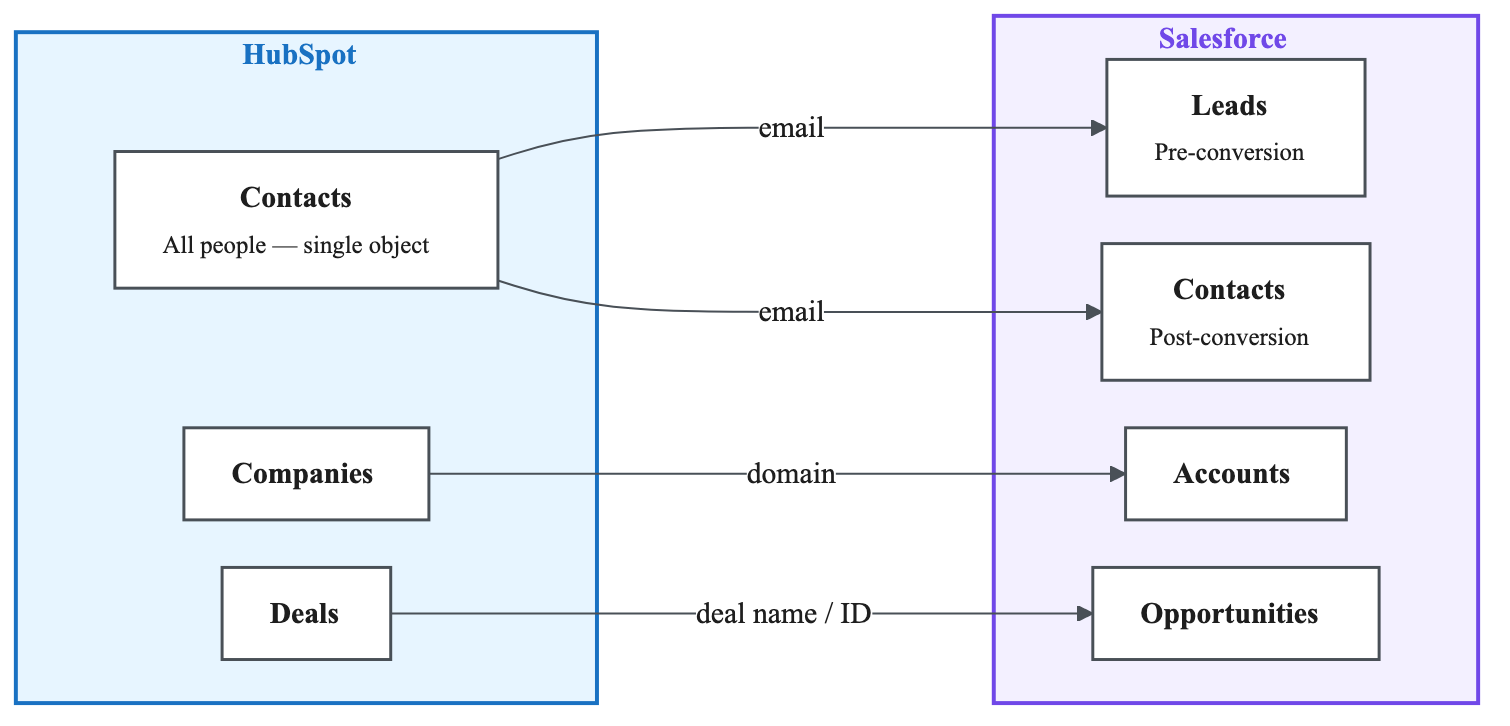
Even when the native integration syncs records between the two platforms, the meaning of those records diverges. A "qualified lead" in Salesforce might map to a lifecycle stage in HubSpot, but the criteria, the timing, and the count will differ.
The sync gap
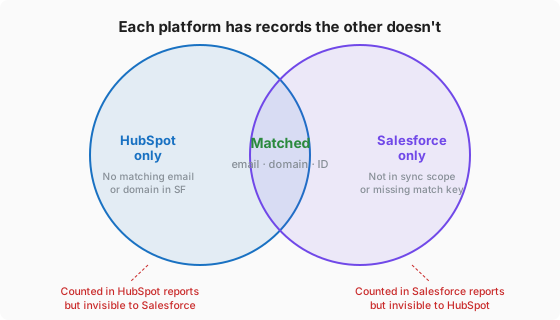
The native HubSpot-Salesforce integration syncs records bi-directionally. It does not sync analytics. You get data flowing between the two systems, but each platform's reporting engine still only sees its own world. There's no cross-system query, no unified metric definition, no shared dashboard.
The custom object problem
Companies with five or more years on Salesforce accumulate custom objects, custom fields, and custom automation logic that represent real business processes. These are often the most valuable data in your CRM — and the hardest to report on. HubSpot's integration can sync some custom objects, but it requires Enterprise tier ($3,600/mo) and still can't replicate the full relational complexity.
The metric definition problem
"Lead" means something different in Salesforce than in HubSpot. "Pipeline value" is calculated differently. "Conversion rate" depends on which system's denominator you're using. Without a shared definition layer, every report is a potential argument between teams.
Approach 1: Pick a Source of Truth (And Force Everything Into One System)
The most intuitive approach: sync all HubSpot data into Salesforce (or vice versa) and just report from one platform.
Why teams try it
It's the simplest mental model. "Let's just use Salesforce for everything." Or: "HubSpot has a native Salesforce integration — let's sync it all over and build our dashboards there."
Why it fails
Cost gates are steep. HubSpot custom object sync requires Enterprise tier ($3,600/mo). Salesforce reporting on imported marketing data often requires additional licenses or add-ons. The sticker price of "just use one system" is higher than it looks.
Integrations are fragile. Most HubSpot-Salesforce integrations fail not during setup, but over time. Without strict sync rules, you get field overwrites, duplicate records, and silent data loss. Missing inclusion filters mean junk records flow between systems. This isn't set-and-forget infrastructure — it requires weekly monitoring, error log reviews, and ongoing mapping adjustments as your GTM process evolves.
You're fighting the tool. Salesforce's report builder isn't designed for marketing analytics. HubSpot's isn't designed for complex pipeline forecasting. Forcing one platform to do the other's analytical job means fighting its interface, working around its limitations, and building reports that are perpetually fragile.
Data quality degrades. The more you sync, the more surface area you create for inconsistency. Fields get overwritten with stale values. Records duplicate. Timestamps drift. The integration that was supposed to create a source of truth becomes a source of doubt.
Even if you get this working perfectly today, you're still reporting inside one platform's limited builder — with all its quirks, restrictions, and blind spots.
Approach 2: Report Natively in Each Platform (And Manually Reconcile)
The alternative: give up on unification. Let marketing own HubSpot reports, let sales own Salesforce reports, and have someone in ops reconcile the numbers when leadership asks questions that span both.
Why teams try it
It avoids the integration minefield entirely. Each team uses what they know. Nobody has to learn a new tool.
Why it fails
Platform-specific expertise doesn't transfer. Learning Salesforce's report builder teaches you nothing about HubSpot's, and vice versa. Each has its own quirks: custom report types, filter logic, dashboard limitations, formula syntax. You're essentially learning two proprietary query languages — neither of which you can take with you to a third system when you add Stripe, GA4, or your product database.
Cross-system questions are impossible. "Which marketing campaigns drove our highest-value closed deals?" requires data from both platforms. Neither can answer it alone. "What's the true cost of acquisition from first touch to closed revenue?" spans HubSpot campaigns and Salesforce opportunities. These are the questions leadership actually asks — and they're precisely the ones siloed reporting can't answer.
The reconciliation tax is real. Someone — usually the most capable ops person on the team — spends hours each week exporting data, joining it in spreadsheets, reformatting columns, and building one-off analyses that are already stale by the time they're shared. This is skilled labor being spent on mechanical work. It doesn't scale, and it burns out your best people.
Expertise becomes a bottleneck. The person who understands both platforms' reporting becomes a single point of failure. When they go on vacation, reports don't get built. When they leave, institutional knowledge walks out the door.
The underlying issue: both platforms' reporting tools are designed for operating within that platform, not for analyzing across your business.
Approach 3: Use a Data Platform (The Right Way)
The third approach separates execution from analytics entirely. Both Salesforce and HubSpot keep doing what they're good at — managing customer relationships and running marketing automation. Analytics happens in a purpose-built layer that ingests data from both systems and governs it in one place.
Why it works
Single source of truth without forcing one system to be it. A data platform pulls from both Salesforce and HubSpot (and any other source you connect). It doesn't replace either system — it reads from them. You report on a unified dataset without disrupting how either team operates day-to-day.
Pre-built data models. Platforms like Definite auto-generate models for standard objects from both HubSpot and Salesforce — contacts, deals, campaigns, emails, pipelines, stages — the moment you connect. No manual mapping, no schema design, no SQL. The models are ready to query immediately.
Governed metrics. A semantic layer ensures "lead" means the same thing whether the data originated in Salesforce or HubSpot. Metric definitions are centralized. When the VP of Sales and the VP of Marketing look at the same dashboard, they see the same numbers — because the definitions are shared, not siloed.
No SQL required. This matters more than technical teams realize. Most companies running Salesforce + HubSpot don't have a data engineer or an analytics team. They have marketing ops people, sales ops people, and busy executives. An AI-powered assistant that lets you ask "How many leads did we create each quarter? What's the growth month over month?" in plain English — and gets the right answer without pointing to a specific table — is the difference between self-service analytics and analytics-that-requires-a-specialist.
Custom objects handled. Even complex Salesforce orgs with years of accumulated custom objects and fields can be modeled and queried. If there's a custom object with data that matters to your business, it can be brought into the analytics layer and reported on — alongside everything else.
Transferable knowledge. You learn one analytics interface. When you add a third source — Stripe for revenue, GA4 for web traffic, your product database for usage — the skills transfer. You're not learning another proprietary report builder. You're asking questions of a unified dataset that keeps growing.
What the process actually looks like
-
Connect your sources. Salesforce connects via OAuth (click "authorize," log in, done). HubSpot connects via an access token with step-by-step setup instructions (here's a 2-minute walkthrough). Both take minutes.
-
IT review. Your IT team will want to see compliance documentation. Look for SOC 2 Type II certification, privacy policies, and penetration testing reports — these should be available in a public trust center before you start the procurement conversation.
-
Auto-generated models appear. As soon as sources are connected, the platform spins up a unified data layer with standard models for both Salesforce and HubSpot objects.
-
Define your metrics. Start with the pre-built templates that cover common metrics (lead creation, pipeline value, deal velocity, email performance). Then customize: what specific KPIs does your leadership team need? What custom Salesforce objects are critical to your business? A good platform vendor will help you define these in the first week.
-
Build dashboards and start querying. Unified dashboards pull from both systems. When a dashboard raises a follow-up question — "Why did lead volume drop in Q3?" or "Which campaign drove that spike in pipeline?" — drill down using the AI assistant for detailed analysis without leaving the platform.
-
Iterate. As your team uses the platform, you'll discover new questions to answer, new metrics to govern, and new sources to connect. The platform grows with you.
What can't your CRM reports answer?
Enter your domain and we'll show you what cross-system questions become answerable when HubSpot and Salesforce data live in the same place.
Try it with any company domain — no signup required.
Pricing Reality Check
Analytics tooling for HubSpot + Salesforce isn't free — but it's worth comparing the options honestly.
| Approach | Typical Cost | What You Get |
|---|---|---|
| HubSpot Operations Hub | $890–$3,600/mo | Data sync + workflow automation. Still reporting inside HubSpot. |
| Salesforce add-on reporting | $75–$300/user/mo | Better Salesforce reports. No HubSpot data. |
| Part-time analyst / consultant | $3,000–$5,000/mo | Human reconciliation. Doesn't scale. Single point of failure. |
| Definite (data platform) | ~$1,650/mo | $250 platform + $700/connector × 2. Unified analytics across both sources. Pre-built models, governed metrics, AI assistant. |
Definite offers a free 2-week trial with full platform access — connect your sources, build your first dashboards, and validate with your team before committing. Monthly subscription with no annual lock-in required (annual plans available at ~10% discount).
The real cost comparison isn't Definite vs. nothing — it's Definite vs. the hours your ops team currently spends manually reconciling reports, the decisions delayed because nobody trusts the numbers, and the HubSpot/Salesforce tier upgrades you'd need to get halfway to the same result.
Getting Started
If you're running Salesforce and HubSpot together, you don't need to become an expert in both platforms' report builders. You don't need to build a fragile integration and pray it holds. And you don't need to hire a data engineer.
You need your data in one place, with metrics everyone agrees on, queryable by anyone on your team.
That's what Definite does:
- Unified. Salesforce + HubSpot + whatever comes next, in one analytics layer.
- Simple. Pre-built templates and dashboards. No SQL. True self-service for non-technical teams.
- AI-Powered. Ask questions in plain English. Drill down from any dashboard. Get answers in seconds.
- Open. Built on open standards (DuckDB, Iceberg/Parquet, Cube.dev). Your data stays yours. No vendor lock-in.
Running HubSpot for marketing? Read our complete guide to HubSpot RevOps Data Automation for a deep dive into building an intelligence layer on top of HubSpot specifically.