


The Real Cost of SQL Server as a Data Warehouse

If you're running analytics on Microsoft SQL Server, you likely didn't choose it. You probably adopted it. Maybe the company was built on it ten years ago. Maybe the person who set up the reporting has since left. Maybe you've inherited a tangle of SQL Server databases, Tableau dashboards nobody trusts, and Excel workbooks being passed around on Slack.
Now someone — your board, your investors, your own gut — is asking for better data. And the first question that comes up is: can we just use SQL Server as our data warehouse?
The honest answer is: yes, technically. But the better question is whether you should — and what it'll actually cost you when you add up the ETL, the BI layer, the engineering time, and the maintenance. (Spoiler: you don't have to rip out SQL Server to fix this. But you probably shouldn't build a warehouse on top of it either.)
Is SQL Server a Data Warehouse?
SQL Server is a relational database management system. It was built for OLTP — online transaction processing. That means it's optimized for recording transactions: customer signups, order placements, payment processing. Lots of small, fast writes. Row-based storage. Normalized schemas to keep data consistent.
A data warehouse is a different animal. Warehouses are built for OLAP — online analytical processing. They're designed to aggregate data from multiple sources, scan millions of rows, and return results for complex analytical queries. Different storage patterns. Different performance characteristics. Different purpose.
SQL Server isn't a data warehouse by default. But Microsoft has been adding warehouse-oriented features for over a decade:
- Columnstore indexes (since 2012): up to 10x query performance and 10x data compression for analytical workloads
- Table partitioning: split large tables across filegroups for faster scans
- Star schema support: proper fact and dimension table modeling
- SSIS (SQL Server Integration Services): Microsoft's built-in ETL engine
SQL Server 2022 pushed this further with Azure Synapse Link for near-real-time analytics, S3-compatible object storage via PolyBase, and Parquet file querying through T-SQL. These are real capabilities that no other article covering this topic seems to mention.
So yes — SQL Server can function as a data warehouse. The question is what that actually looks like in practice.
How Teams Actually Use SQL Server as a Data Warehouse
In theory, you set up a separate SQL Server instance, model a proper star schema, build ETL pipelines with SSIS, and query your warehouse through Power BI. By the book.
In practice, most teams land on one of three patterns:
Pattern 1: Separate instance, star schema. The textbook approach. A dedicated SQL Server instance with dimensional modeling, scheduled ETL loads, and a BI tool on top. This works — but it requires a DBA who knows warehouse design, ongoing SSIS maintenance, and the budget for a separate SQL Server license.
Pattern 2: Same instance, reporting views. The path of least resistance. You create views on top of your production database to serve analytical queries. No separate infrastructure, no ETL. This is what most teams default to — and it's where problems start. Analytical queries compete with production transactions for CPU and memory. Practitioners on r/SQLServer report hitting 99% CPU, 8GB memory constraints, and query times stretching to 4-7 hours. Microsoft's own guidance explicitly recommends against running analytical workloads on production instances.
Pattern 3: SQL Server + Azure Synapse hybrid. SQL Server 2022's Synapse Link lets you replicate data to Azure Synapse Analytics for cloud-scale analysis. This is Microsoft's recommended modernization path — but it adds Azure costs, networking complexity, and a second query engine to learn (Synapse uses a different T-SQL dialect with notable limitations).
If you're on Pattern 2 — running analytics against production — and the dashboards are slow, the numbers don't match, and the person who built the views left two years ago, you're not alone. That's the most common scenario, and it's exactly where the "just use SQL Server" approach starts to break down.
The Hidden Cost of Making SQL Server Your Data Warehouse
Here's what the tutorials don't cover: SQL Server is just storage. To get from "data warehouse" to "business answers," you need an entire stack around it.
ETL / data movement. SSIS is included with your SQL Server license (on the same machine), but it's a tool in limbo. Microsoft is investing in Azure Data Factory and Fabric, not SSIS — but teams that tried migrating to ADF report cost overruns and performance regressions. Even Andy Leonard, a recognized SSIS MVP, published "Upgrading from SSIS — Can We Talk?" in January 2026, acknowledging the community's frustration. If you run SSIS on a separate server, you need a separate SQL Server license. Modern alternatives like dbt and Airflow work, but require engineering skills to set up and maintain.
BI and visualization. SQL Server doesn't include dashboards. Power BI Pro costs $14/user/month — up 40% from $10 as of April 2025. Tableau Explorer runs $42/user/month. For a 20-person team where everyone needs report access, that's $3,360–$10,080/year in BI licensing alone.
Semantic layer and metric governance. This is the piece almost every SQL Server warehouse setup is missing. When your VP of Sales and your CFO pull "revenue" and get different numbers, the problem isn't the query — it's that there's no single source of truth for what "revenue" means.
SQL Server has no native semantic layer. Power BI has a lightweight semantic model (formerly "datasets"), but it's tied to Power BI — it doesn't govern metrics across other tools, AI queries, or API consumers. The AtScale 2026 State of the Semantic Layer report positions semantic layers as "essential infrastructure for enterprise AI." Most SQL Server warehouse setups don't have one.
Engineering and maintenance. Someone needs to build this, tune it, and keep it running. The average data engineer salary in the US is $133,000/year. Even a half-time DBA dedicated to warehouse maintenance is a $60K+/year cost.
Add it up for a mid-market team:
| Cost | SQL Server Data Warehouse Stack |
|---|---|
| SQL Server Standard (16-core) | ~$33,600 (one-time licensing) |
| SSIS or dbt + orchestration | $0–$5,000/yr (engineering time is the real cost) |
| Power BI Pro (20 users) | $3,360/yr |
| Data engineer (half-time) | $65,000/yr |
| DBA maintenance | $20,000–$40,000/yr |
| Annual operating cost | $90,000–$115,000+/yr |
And that's before you factor in the 4-8 months it typically takes to implement a mid-market data warehouse — months where you're paying the total cost of ownership but not yet getting answers.
For context, 41% of organizations have experienced data warehouse project failures, and only 48% of digital initiatives meet their business outcome targets according to Gartner.
Do You Actually Need a Data Warehouse?
It's worth asking the real question: do you need a data warehouse, or do you need trustworthy analytics?
A data warehouse is an architectural pattern — it's a way of organizing data for analysis. But what most teams actually want is simpler:
- Combine data from multiple sources into one place (your database, your CRM, your payment processor, your marketing tools)
- Trustworthy numbers — one definition of "revenue," "churn," and "active users" that everyone uses
- Let non-technical people get answers without going through IT or waiting for someone to write SQL
- Move fast — get to insights in days, not months
A warehouse gives you the first bullet. It doesn't solve the rest — not without an ETL layer, a semantic layer, a BI tool, and engineering time to tie them together. That's the gap where teams get stuck: they build the warehouse and call it done, but the business still can't get answers.
When SQL Server Still Makes Sense
Let's be fair. SQL Server is a strong database platform, and there are legitimate scenarios where using it as a data warehouse works well:
- You have a dedicated DBA who knows warehouse design and has capacity to maintain it
- Single-source reporting — you're analyzing data from SQL Server itself, not combining it with CRM, marketing, or product data from other systems
- You're all-in on Microsoft — SQL Server, Power BI, Azure, M365. The integration story across the Microsoft ecosystem is real, and if you're already paying for E5 licenses, Power BI Pro is included
- Compliance requires on-premise — regulated industries where data can't leave your infrastructure (though Definite's enterprise plan now includes private deployment in your own environment)
- Your IT team has deep SQL Server expertise and the capacity to own the pipeline long-term
If that's your situation, SQL Server can be a solid foundation. Columnstore indexes and proper star schema modeling handle analytical workloads well — don't let anyone tell you SQL Server can't do serious warehouse work.
When You've Outgrown It
But there are clear signals that the SQL Server warehouse approach has hit its ceiling:
Multiple data sources that don't connect. Your business runs on SQL Server and Salesforce and Stripe and HubSpot and Google Analytics. The warehouse only has one of those. Everyone else is working off manual exports and spreadsheets. And the moment you point a reporting tool at SQL Server, someone asks a question about data that lives in the CRM — and the warehouse doesn't have it. Every missing source is another pipeline you have to build or another question that goes unanswered.
Nobody trusts the numbers. You ask for revenue and get three different answers depending on who pulls it. There's no governed metric layer — every analyst writes their own calculation. If your Tableau dashboards are broken, the problem usually isn't Tableau — it's the data underneath. Ungoverned queries against inconsistent views produce inconsistent answers.
The person who built it left. The SSIS packages, the stored procedures, the reporting views — they're all undocumented, and nobody fully understands them. This is more common than it should be. Reddit threads about SQL Server warehousing are full of teams that are "6 months on and we've done nothing" because nobody can figure out what the previous person built.
Non-technical people can't get answers. The CEO can't check pipeline metrics without asking IT. The VP of Sales can't segment customers without a SQL query. Regional leads want their portfolio broken down by conversion rate or credit profile — and every one of those requests lands on the same one or two people who know SQL. The backlog grows, the ad hoc requests pile up, and half of them get answered too late to matter.
You're preparing for AI. This is the one nobody talks about yet. A lot of companies stood up an AI task force in 2024, got excited, then quietly tabled it when they realized the data underneath wasn't ready. Now the mandate is back — with clearer policies and real executive sponsorship — but the foundation still hasn't changed. If your company is exploring AI-driven analytics — natural language queries, automated insights, data agents — you need a governed, semantically consistent data foundation. AI layered on top of ungoverned SQL Server views produces hallucinated metrics and wrong answers. Gartner predicts 80% of data and analytics governance initiatives will fail by 2027 — and governance is exactly what most SQL Server warehouse setups don't have.
Microsoft's own upgrade path isn't simple. Microsoft wants you to go from SQL Server to Synapse to Fabric. It's a coherent vision on a slide deck, but in practice it means learning new query engines, managing Azure capacity units, and navigating Fabric's complex pricing model. If you're going to re-platform anyway, it's worth asking whether the Microsoft path is the right one — or just the familiar one.
What could your data tell you?
Enter your domain and we’ll show you the business questions your tools can already answer — you just can’t ask them yet.
Try it with any company domain — no signup required.
What the Alternative Looks Like
There's a category of platform that didn't exist when most SQL Server warehouses were built: integrated analytics platforms that bundle ingestion, storage, a semantic layer, visualization, and AI into one system.
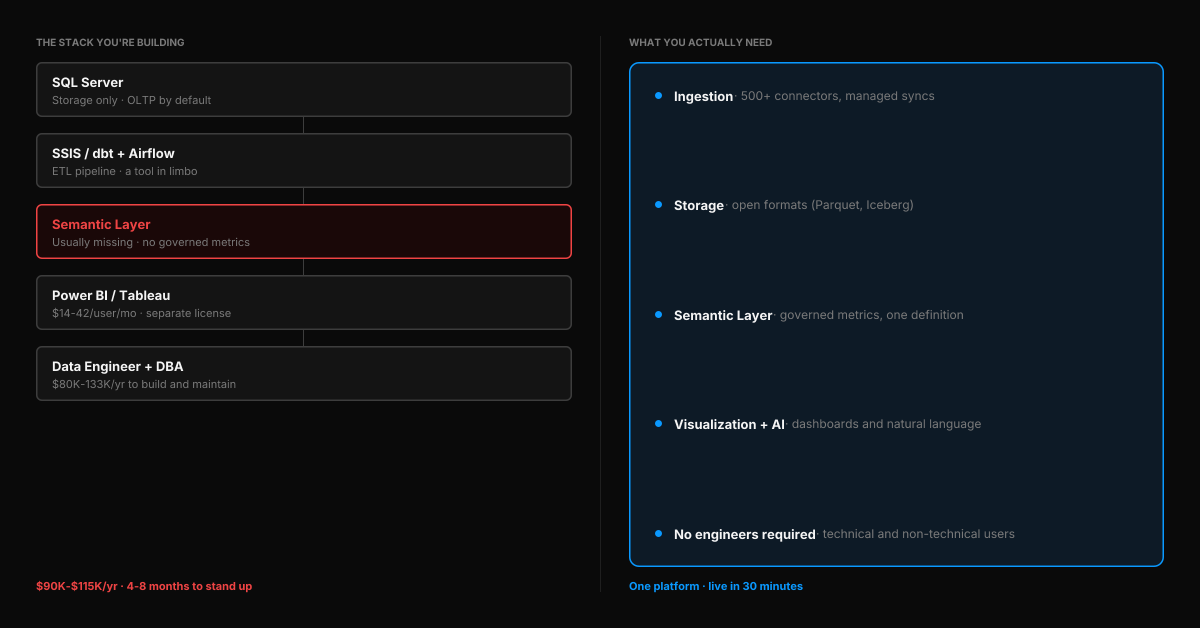
Instead of assembling SQL Server + SSIS + dbt + Power BI + a data engineer to maintain it, you connect your data sources and start getting answers. One platform. One set of governed metric definitions. One place where technical and non-technical users can both work.
Definite is one of these platforms. It connects directly to SQL Server (as a source), plus 500+ other data sources — so your database, CRM, payment processor, and marketing tools all land in one place. The built-in semantic layer (powered by Cube) means "revenue" is defined once and used everywhere — across dashboards, AI queries, and API consumers. The AI assistant (Fi) queries governed metrics — not raw tables — so the answers are consistent whether your CEO asks in plain English or your analyst writes SQL.
Technical users still get full SQL access and can define custom metrics in the semantic layer. Python is available for advanced transformations. Data is stored in open formats (Parquet, Iceberg) — if you ever leave, you export everything. This isn't a no-code toy — it's a platform that works for the people who need dashboards and the people who need to model the data underneath.
The difference isn't just features — it's time. A SQL Server data warehouse project takes 4-8 months. With Definite, teams typically connect their first data source and see live dashboards within 30 minutes of signup — no schema design, no ETL pipeline, no infrastructure to provision.
Your SQL Server data isn't going anywhere. Definite doesn't replace SQL Server — it connects to it. What it replaces is the need to build the warehouse, the pipelines, and the BI layer around it.
If this sounds like your situation, try Definite free or watch the demo to see how it connects to your SQL Server in minutes.
FAQ
Can SQL Server handle large-scale analytics?
Yes — with the right configuration. Columnstore indexes, table partitioning, and dedicated hardware can support analytical workloads at hundreds of gigabytes. SQL Server 2022 added Synapse Link and S3 integration for hybrid cloud scenarios. The question isn't whether SQL Server can handle analytics — it's whether building and maintaining that setup is the best use of your team's time and budget.
How long does it take to set up a SQL Server data warehouse?
For a mid-market company, expect 4-8 months from project start to production-ready warehouse. That includes schema design, ETL pipeline development, BI tool integration, and testing. Small, single-source projects can be faster (2-3 months). Enterprise projects often run 9+ months.
What's the difference between SQL Server and Azure Synapse?
SQL Server is Microsoft's traditional relational database — it runs on-premise or on Azure VMs. Azure Synapse Analytics (formerly Azure SQL Data Warehouse) is a cloud-native analytics service with massively parallel processing (MPP) designed for large-scale analytical queries. Synapse uses a different T-SQL dialect with some limitations (no recursive CTEs, limited stored procedures, no table variables). SQL Server 2022's Synapse Link bridges the two by replicating data from on-prem SQL Server to Synapse for cloud analytics.
Do I need a data engineer to build a data warehouse?
For a proper SQL Server data warehouse — practically, yes. Designing star schemas, building ETL pipelines, tuning queries, and maintaining the system requires specialized skills. Integrated analytics platforms like Definite are designed to eliminate this requirement for getting started and getting answers — you can connect data sources, define metrics, and start querying in a day. Complex use cases (custom transformations, advanced modeling) still benefit from technical talent, but the platform supports SQL and Python for power users alongside the visual interface.
Can I move off SQL Server for analytics without losing my data?
Yes. Modern analytics platforms connect to SQL Server as a data source — your production database stays exactly where it is. You're not replacing SQL Server; you're connecting it to a system that makes its data usable for analytics alongside your other business tools. If you later need to export from the analytics platform, open standards (Parquet, Iceberg) ensure your data isn't locked in.