


How to Manage Your Entire Data Platform from Claude Code
Most MCP tutorials show you how to connect developer tools — GitHub, Sentry, Linear — to Claude Code. Developer infrastructure. But what about the rest of the business? Your Stripe revenue, your Salesforce pipeline, your production Postgres database.
In the video above, we set up Definite's MCP server in one command and then manage an entire data platform from Claude Code: connecting data sources, querying with raw SQL, pulling governed metrics from a semantic layer, combining data across sources, and building a live dashboard. This post walks through each step with the actual commands and queries.
What Definite's MCP Server Exposes
Definite is an all-in-one data platform. You connect your data sources, it syncs everything into a hosted data warehouse powered by DuckDB, and it has a semantic layer (built on Cube) so your metrics stay consistent across every query. There's also a visualization layer for dashboards and reports.
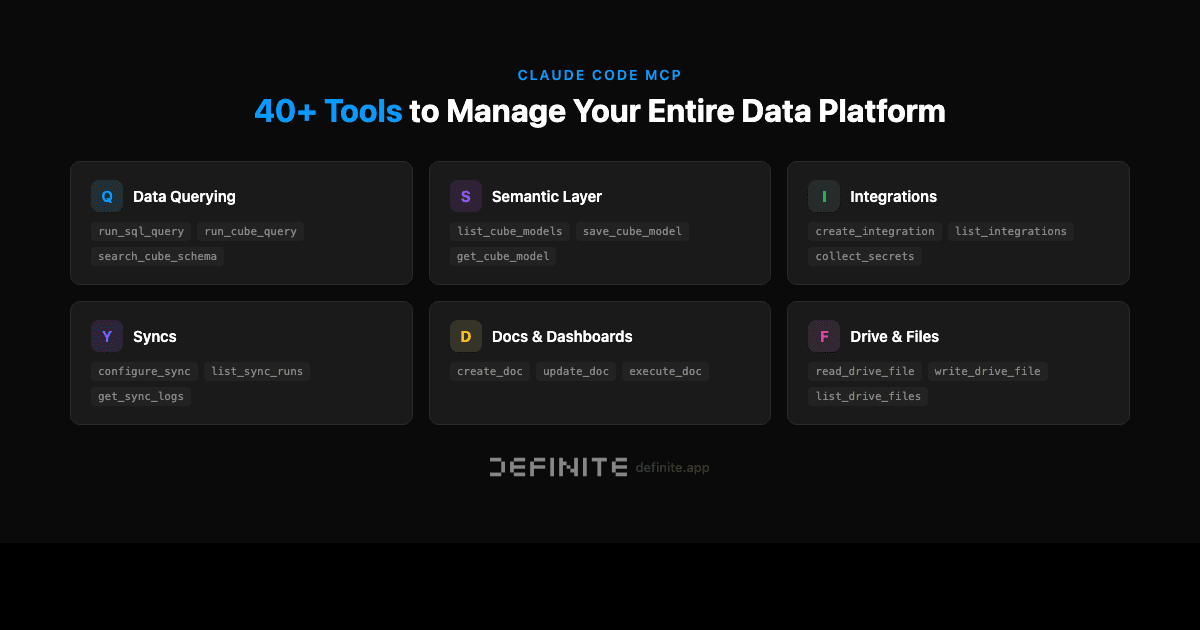
The MCP server gives Claude Code access to the entire platform — over 40 tools organized across six categories:
| Category | What it does | Key tools |
|---|---|---|
| Data Querying | Run SQL or semantic layer queries | run_sql_query, run_cube_query |
| Semantic Layer | Manage governed metric definitions | list_cube_models, save_cube_model |
| Integrations | Connect and manage data sources | create_integration, list_integrations |
| Syncs | Configure and monitor data pipelines | configure_sync, list_sync_runs |
| Docs & Dashboards | Build and update dashboards | create_doc, update_doc, execute_doc |
| Drive & Files | Store and retrieve files | read_drive_file, write_drive_file |
This isn't a read-only query interface. You can connect new data sources, build dashboards, update semantic models, and monitor sync pipelines — all from the terminal.
Setup: One Command
Grab your API key from Definite (bottom-left user menu), then run:
claude mcp add definite --transport http https://api.definite.app/v3/mcp/http --header "Authorization: YOUR_API_KEY"
Verify with claude mcp list. That's it. Claude Code now has access to the full platform.
Connecting Data Sources
You can connect data sources directly from Claude Code. Ask Claude to "Connect my Stripe account to Definite" and it will call create_integration, prompt for your API key through a secure URL, and configure the sync schedule.
Definite has over 500 connectors — SaaS tools, databases, file storage, advertising platforms. The initial syncs run in the background, and data lands in DuckDB within minutes for most sources.
Querying with Raw SQL
Once your data is synced, you can query it directly:
Show me total Stripe charges by month for the last 6 months
Claude writes and executes a SQL query against the Stripe data in your warehouse:
SELECT
  DATE_TRUNC('month', created) AS month,
  COUNT(*) AS charges,
  SUM(amount / 100.0) AS total_revenue
FROM LAKE.SAAS_STRIPE.charges
WHERE status = 'succeeded'
GROUP BY 1
ORDER BY 1 DESC
LIMIT 6
This runs against DuckDB — the same database all your sources sync into. Every source you connect lands in the same warehouse, queryable with standard SQL.
Governed Metrics with the Semantic Layer
Raw SQL works, but it has a problem: every query is a new calculation. Ask three people to write "MRR" in SQL and you'll get three different formulas. One includes trials, another excludes annual plans, the third uses a different date cutoff.
The semantic layer solves this. Instead of writing SQL, you can query pre-defined metrics:
What's my current MRR and ARR?
Claude calls run_cube_query instead of run_sql_query — pulling from the semantic layer where MRR, ARR, churn rate, and other metrics have governed definitions your team has already agreed on.
The difference matters most when AI agents are doing the querying. If your CEO asks "what's our MRR?" through Fi, through Claude Code, or through a Slack bot, you want the same number every time. The semantic layer guarantees that — no LLM is inventing a formula on the fly.
Cross-Source Queries
The real power shows up when you combine data across sources:
Show me MRR by customer segment and open pipeline by industry
One prompt. Claude queries the semantic layer and returns Stripe billing data and Salesforce CRM data in the same response. Enterprise MRR, SMB MRR, Mid-Market MRR — alongside pipeline by industry.
This is the question that normally requires three browser tabs and a spreadsheet. Open Stripe for revenue. Open Salesforce for pipeline. Copy numbers into a Google Sheet. Repeat next month. With Definite, both sources live in the same warehouse, modeled in the same semantic layer, and queryable in a single prompt.
Building Dashboards from the Terminal
Terminal output is useful for ad hoc analysis, but when the CEO needs a shareable link, you need a dashboard. Claude can build that too:
Create a dashboard with MRR trend, pipeline by stage, and a summary of active accounts
Claude calls create_doc with a full YAML definition — KPI cards, charts, tables — and returns a URL. Open it in the browser and you have a live dashboard that refreshes with your data. Send the link to your CEO, embed it in a Notion doc, or pin it to your Definite home screen.
You can also update dashboards conversationally. In the video, we asked Claude to add hover tooltips that explain how each metric is calculated — and it modified the data app in place.
What This Replaces
Without a platform like Definite, getting cross-source business metrics typically looks like one of two paths:
Path A: Manual tab-switching. Open Stripe for revenue. Open Salesforce for pipeline. Open a database client for product data. Copy-paste into a spreadsheet. Repeat every month. This works but doesn't scale, and the numbers are stale by the time anyone reads them.
Path B: Build a data stack. Set up Snowflake, Fivetran, dbt, and Looker. Four tools, four vendor relationships, and typically a data engineer to maintain it. A mid-range stack runs $3,000-$5,000/month before headcount.
Definite collapses both paths into one platform. The MCP server extends it into the tools developers already use — Claude Code, Cursor, Claude Desktop — without requiring anyone to learn a new BI tool or context-switch to a dashboard.
Getting Started
- Sign up for Definite (free tier includes everything shown in the video)
- Connect your data sources through the UI or CLI
- Run the setup command:
claude mcp add definite --transport http https://api.definite.app/v3/mcp/http --header "Authorization: YOUR_API_KEY"
The MCP documentation covers advanced configuration, including scoping access to specific integrations and configuring the semantic layer.