


Replace Your Data Stack with Claude Code

The Short above is 60 seconds. In it, I run four prompts in Claude Code: connect an API to a managed data lake, model the data with Cube, build a data app, and refine the app with a 3D shot chart. The result is real — a deployed app reading governed metrics — but a 60-second demo isn't a fair picture of running a data stack day-to-day. This post is the longer version: what each prompt actually does, what it replaces, and where the approach has limits.
What "data stack" usually means
When a founder says "we need to set up our data stack," what they usually end up signing up for is some version of this:
| Layer | Typical tool | Job |
|---|---|---|
| Ingest | Fivetran / Airbyte | Pull data from APIs and databases |
| Store | Snowflake / BigQuery | Warehouse the raw and transformed data |
| Transform | dbt | Model raw tables into analytics-ready ones |
| Semantic layer | Cube Cloud / LookML | Define metrics once, reuse everywhere |
| BI | Looker / Tableau / Mode | Build dashboards |
| Reverse ETL | Hightouch / Census | Push modeled data back into ops tools |
| Embedded analytics | Retool / Hex / custom | Build the actual customer-facing app |
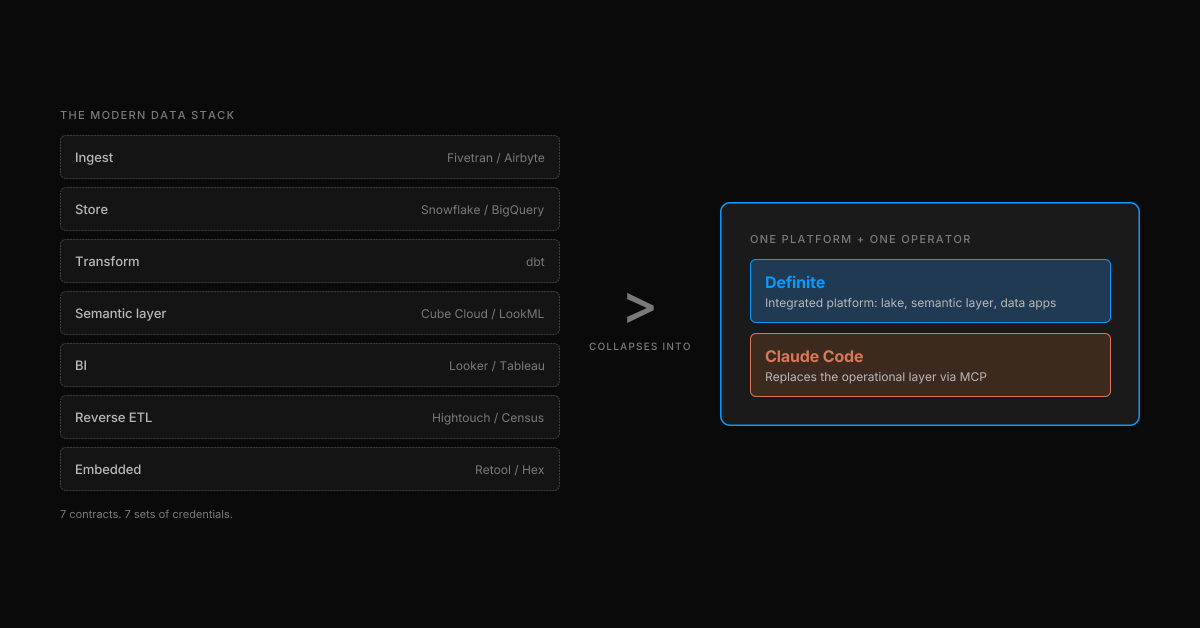
That's seven products, seven contracts, and seven sets of credentials. None of them know the others exist. The hidden line item — the one that doesn't show up on the renewal — is the operational layer: a data engineer to wire and maintain the pipelines, an analytics engineer to keep the models honest, and the coordination overhead of moving any change through all of them. By the time the first dashboard is live, the business has moved on.
Definite collapses the seven products into one platform — the bet behind "the modern data stack is dead". Claude Code, with the Definite MCP server, collapses the operational layer — most of the engineer-hours and the cross-tool glue that the seven products demand. The four prompts below are what that looks like in practice.
The setup: one MCP install
The whole demo runs on one install command, pasted into Claude Code:
claude mcp add definite \
  --transport http \
  https://api.definite.app/v3/mcp/http \
  --header "Authorization: YOUR_API_KEY"
That's it. Claude Code now has a Definite tool surface — more than 30 tools across six categories: Query (SQL and Cube), Semantic Layer, Integrations, Syncs, Docs (the YAML-driven dashboard and pipeline format), and Drive (the file store data apps deploy from). There's nothing to provision, nothing to scaffold, no warehouse to spin up. The lake is hosted, the semantic layer is governed, the data-app runtime is live.
From here, the rest of the work happens in plain English. (For a tool-by-tool walkthrough of the MCP surface against Stripe and Salesforce data, see "How to Manage Your Entire Data Platform from Claude Code".)
Prompt 1 — Connect and sync
"Connect to the NBA stats API and sync the data into our DuckLake. Schedule it daily at 10am PT."
Claude Code reads the prompt, picks the right MCP tools, and runs them in sequence:
create_doc— creates a new pipeline doc named "NBA daily refresh"update_doc_dataset— writes a Python stage that callsnba_api.stats.endpointsand lands the raw dataupdate_doc_dataset— adds a dependent stage for line-score pullsexecute_doc— schedules the whole thing on0 10 * * *
A few seconds later, the terminal prints a "View data lake →" link. Click it, and the DuckLake-backed catalog is already populated under lake.new_nba: teams, team_stats, games, player_game_logs, shot_chart_data, line_scores, common_player_info. Every table from the source API, scheduled, governed, queryable.
What goes away: the engineer-hours. The infrastructure to ingest, store, and schedule still exists — Definite is running it underneath. What's gone is the work of standing it up: writing the Python, configuring the orchestrator, picking a warehouse table layout, wiring credentials. Because there's no off-the-shelf connector for the NBA API, the alternative would have been a custom Python pipeline on Airflow — a week of work for a single engineer. Here it's one prompt.
The point isn't "we have an NBA connector." We don't, and we don't need one. The MCP server gives Claude Code the verbs (create_doc, update_doc_dataset, execute_doc) to assemble a pipeline against any source it can reach. Definite already has 500+ pre-built connectors for the common ones — Stripe, Salesforce, HubSpot, Shopify, Postgres, BigQuery — but the long tail is just a prompt.
Prompt 2 — Model with Cube
"Now model this data with Cube — semantic models for player-game stats and team-game stats."
Claude Code calls save_cube_model three times:
nba_player_games— measures: pts, rebs, asts, fg_pct; dimensions: player_name, team, game_datenba_team_games— measures: pts, fg_pct, plus_minus; dimensions: team, opponent, game_datenba_teams— measures: season_wins, season_losses; dimensions: team_name, conference
The catalog now shows three Cube models alongside the raw tables. Same UI, different node type. Every measure and dimension is defined once and queryable from anywhere — the data app you're about to build, an external dashboard, a Slack agent, another LLM.
What goes away: the analytics-engineering hours. The semantic layer (Cube) still exists — it's part of the Definite platform. What's gone is the analyst time normally spent writing dbt models, defining measures, reconciling LookML against the warehouse, and re-deriving "MRR" three different ways for three different consumers. Metric drift — the most expensive failure mode of a multi-tool stack — disappears because there's one model, written from one prompt, and every downstream consumer (the data app, an external dashboard, the AI itself) reads through it.
This is the layer most "AI analytics" startups skip, and it's why they fail. A model can write SQL all day; what makes the answer trustworthy is the layer underneath that says what counts as a point.
Prompt 3 — Build the data app
"Now build me a data app to explore this — games list, game detail with box score, player detail with shot chart."
This is the prompt where it stops feeling like a tutorial and starts feeling like the future. Claude Code:
- Writes
app.json(the data app config — pages, routes, queries against the Cube models) - Writes
App.tsx(the actual React code) - Runs the build
- Deploys it
A clickable "Open data app →" link drops into the terminal. Click it and the app is live: a games list filtered by date, drill into a game to see the full box score, drill into a player to see season averages and a static shot chart. All of it powered by the Cube models from prompt 2, which means every number in the UI matches every number in the rest of the system by construction.
What goes away: the frontend-engineering sprint. The data-app runtime still exists — Definite hosts and serves the deployed app. What's gone is the React scaffolding, the routing setup, the query-binding code, and the "where do we host this?" conversation. Because the data app reads through the semantic layer, there's no second copy of the metric logic to maintain — the failure mode that eats most "we'll just build it ourselves" projects.
For more on why a deployed data app beats a dashboard for most exploratory analytics work, see Data Apps: When Standard Dashboards Can't Build What You Actually Need.
Prompt 4 — Refine in place
"Add a 3D shot chart with playback animation."
This is the prompt that I actually find hardest to internalize. After the first three prompts, you have a full stack. After the fourth, you have a better stack — and the cost of "better" is one sentence.
Claude Code reads App.tsx, patches in a Court3D component plus a play button and the projectile animation logic, rebuilds, redeploys. The link is the same URL — same page, same drill state, same data. Refresh, click ▶, and the shots arc onto a 3D court in chronological order. Made shots leave green markers, missed shots leave red ones.
What goes away: the change-request workflow. The version of this story where adding a feature to an internal data app means a Jira ticket, a frontend engineer, a code review, a deploy pipeline, and three days. Here, the cost of "better" is one sentence, plus a few seconds of build time. The refinement loop is the thing — not the initial build.
What you'd have built without this
If you wanted the same outcome — synced source data, governed metrics, a live data app with a custom shot chart — using the conventional modern data stack, the realistic shopping list breaks into two columns: the tools you'd buy, and the people you'd hire to run them.
The infrastructure (what Definite replaces):
- Fivetran or Airbyte + a custom Python pipeline on Airflow for the NBA API
- Snowflake or BigQuery for storage
- dbt for transforms
- Cube Cloud or LookML for the semantic layer
- Retool, Hex, or a custom React app for the data app
The operations (what Claude Code replaces):
- Data engineer to write the pipeline and own the orchestrator
- Analytics engineer to maintain the dbt models and semantic layer
- Frontend engineer to scaffold the data app and wire the 3D shot chart
- Whoever ends up coordinating schema changes through all five tools
That's five SaaS contracts plus the equivalent of one or two full-time engineers to coordinate them. Our data stack cost calculator will give you a real number for your company size and tooling profile — but for most early-stage teams the tooling alone is somewhere between $40k and $150k a year, before you count the engineering salaries.
The trade-off in the modern stack is real flexibility for real cost — both in dollars and in headcount. The argument for replacing it isn't "Definite has every feature each of those tools has." It's that most teams don't need the flexibility, almost all of them underestimate the coordination tax, and Claude Code on top of an integrated platform removes the operational layer that most of the cost actually lives in.
Where this approach is honest about its limits
A few caveats worth stating directly:
- It assumes someone reads the tool calls. Claude Code shows the SQL it ran, the schedules it created, the models it saved. If nobody on the team reads them, you're back to ungoverned analytics. The stack works because the work is auditable, not because it's invisible.
- It assumes governed source data. The NBA API is a clean, well-documented source. If your source data is a 14-tab Google Sheet maintained by your COO, the AI can't fix that — though it can ingest it and tell you exactly where the contradictions are.
- It's not "chat with your data." This is engineering work, expressed in English. Prompt 1 is a pipeline; prompt 2 is a semantic layer; prompt 3 is a frontend app. If your team can't read what came out, Fi (Definite's in-product AI assistant) is the layer for the people who shouldn't be reading SQL — but the four-prompt loop in this post is for engineers and operators who want to ship the stack itself.
- MCP is still maturing. The install command above is one line, but it depends on an MCP-aware client (Claude Code, Claude Desktop, Cursor). The pattern is generalizable, but the tooling is not yet universal.
Try it yourself
If you want to run the same loop against your own data:
- Sign up for Definite — the free tier includes the MCP server, the lake, and the semantic layer
- Install the MCP server in Claude Code — one command, takes about 30 seconds
- Start with a familiar source (Stripe, Salesforce, HubSpot, your production Postgres) and the same four prompts: connect, model, build, refine
The data stack you've been told to build is five contracts and a year of glue work. Claude Code plus the Definite MCP server is one terminal. The first one is what most teams have. The second one is what I'd actually rather use.