


How to Build Unified Google Ads Reporting Across Multiple MCC Accounts
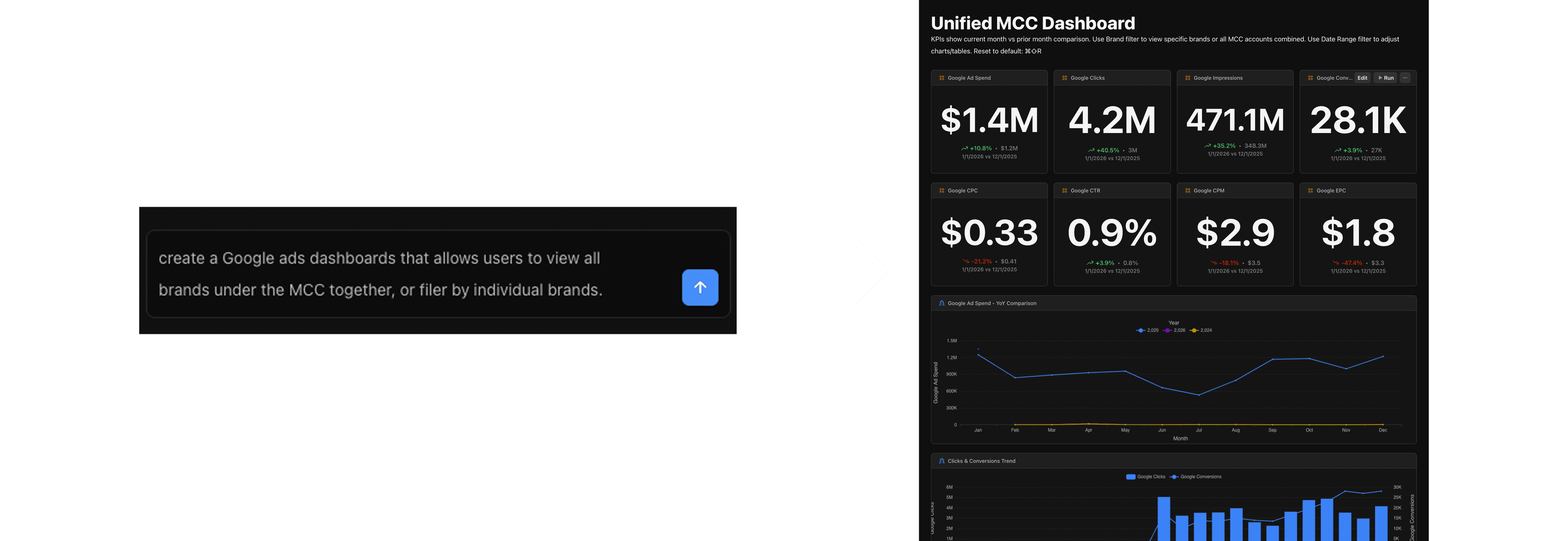
Managing multiple Google Ads accounts under an MCC? Most teams either struggle with Looker Studio's limitations or end up stitching together Fivetran, BigQuery, and Looker just to get a unified dashboard. Definite gives you a simpler path: sync your entire MCC to a managed data warehouse, build unified dashboards, and ask questions in plain English.
Table of Contents
- The Problem with MCC Reporting
- What the Alternatives Get Wrong
- How to Build Unified MCC Reporting in Definite
- What You Get
- Who Is This For?
- Get Started
The Problem with MCC Reporting
If you've ever tried to build unified reporting across multiple Google Ads accounts, you know the pain.
Most teams go one of two routes:
Option 1: Use a BI Tool with Native Connectors
The simplest approach is connecting a BI tool directly to Google Ads:
- Looker Studio (free, native Google Ads connector)
- Tableau (Google Ads connector via CData or direct)
- Power BI (Google Ads connector)
- Metabase or Preset (community connectors)
This works for basic reporting. But these tools hit walls quickly: multi-currency accounts break cost data, you can't blend Google Ads with Shopify or Stripe, and you're limited to whatever the native connector exposes.
Option 2: Build a Data Stack
When BI tools aren't enough, teams stitch together a full data stack:
- ETL tool (Fivetran, Airbyte, Stitch) to sync Google Ads data
- Data warehouse (BigQuery, Snowflake, Redshift) to store it
- Transformation layer (dbt) to model and clean it
- BI tool (Looker, Tableau, Metabase) to visualize it
This gives you flexibility, but now you're managing four vendors, four contracts, and four tools. You need someone who knows SQL. And the bill adds up fast.
Multi-Currency Breaks Cost Data
If your MCC has accounts in different currencies (USD, EUR, GBP), Looker Studio's native connector cannot display cost data. You'll see $0 across the board. This forces you into the full data stack approach.
Data Is Always 24 Hours Behind
BigQuery's native Google Ads data transfer runs once per day. For performance marketers who need to react to spend anomalies quickly, a 24-hour delay is frustrating.
Brand Names Don't Match
Google Ads account names rarely match the brand names in your other systems. Here's what this looks like in practice:
| Brand | Google Ads Account Name | Shopify Store Name | Stripe Account | Internal Name |
|---|---|---|---|---|
| Verde | MCC - Verde Home | verde-home-store | Verde Home LLC | Verde |
| Oasis | MCC - Oasis Living | oasis-official | Oasis & Co | Oasis |
| Summit | Summit_Ads_2024 | summit-gear | Summit Outdoor Inc | Summit |
| Bloom | MCC_Bloom_Brand | bloom-beauty-us | Bloom Beauty LLC | Bloom |
| Coastal | Coastal - Main | coastal-shop | Coastal Products | Coastal |
When you try to join Google Ads spend with Shopify revenue, nothing matches. You end up building spreadsheets to map account names manually, and those spreadsheets break every time someone renames an account or adds a new brand.
These aren't edge cases. They're the standard experience for any team managing more than a handful of Google Ads accounts.
What the Alternatives Get Wrong
Teams that outgrow Looker Studio typically explore these options:
| Solution | Annual Cost | What You Get | The Problem |
|---|---|---|---|
| Supermetrics + Looker Studio | $3,500-$5,000 | Data transfer only | Pricing scales quickly; still need separate BI |
| AgencyAnalytics | $6,000-$10,000 | Client dashboards | Data accuracy issues; limited customization |
| Funnel.io | $12,000-$73,500 | Data platform | Enterprise pricing; FlexPoints unpredictable |
| Fivetran + BigQuery + Looker | $15,000-$50,000 | Full stack | High complexity; requires data engineer |
| Custom API Build | Engineering time | Full control | SQL learning curve; OAuth maintenance |
The gap: None of these solutions give you a complete data stack (warehouse + ETL + semantic layer + BI + AI) at a price under $12K/year without requiring a data engineer.
That's the gap Definite fills.
How to Build Unified MCC Reporting in Definite
We recently built unified Google Ads reporting for a holding company managing 13+ e-commerce brands. Here's exactly how we did it.
Step 1: Connect the MCC
In Definite, you create a custom Google Ads integration with four credentials:
- Developer Token (from Google Ads API Center)
- Client ID and Client Secret (from Google Cloud Console)
- Refresh Token (from OAuth Playground)
- Customer ID (your MCC account number, without dashes)
Yes, you still need to gather these credentials. But once they're in Definite, you don't have to manage OAuth refresh or API rate limits yourself.
Step 2: Sync Data to the Data Warehouse
Once connected, all your Google Ads data syncs automatically to Definite's managed DuckDB data warehouse (DuckLake).
You don't need to provision Snowflake or BigQuery. You don't need to manage infrastructure. The data lands in tables you can query immediately.
For this client, we synced 13+ accounts with full historical data going back to 2023.
Step 3: Build Data Models in the Semantic Layer
In Definite's semantic layer (powered by Cube.js), you define your metrics and dimensions once:
| Type | Examples |
|---|---|
| Measures | Spend, Impressions, Clicks, Conversions, CTR, CPC, ROAS |
| Dimensions | Brand, Account Name, Campaign, Date, Month |
You also create joins. For this client, we joined Google Ads data with:
- Shopify revenue by brand
- Facebook Ads spend by brand
- Amazon Seller Central sales by brand
- A brand mapping table that standardizes account names (see how to build unified Shopify analytics across multiple stores for the full multi-store setup)
Step 4: Create Brand Mapping
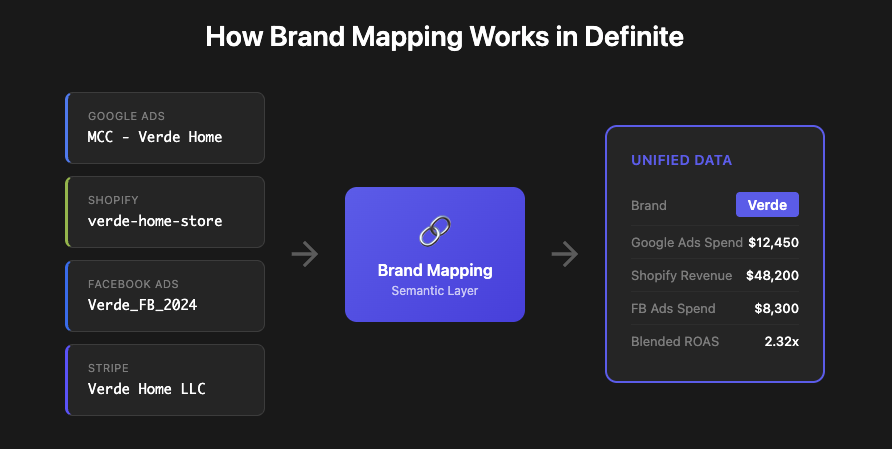
Google Ads account names rarely match the brand names you use internally. "MCC - Verde Home" in Google Ads might be "Verde" in your Shopify data.
In Definite, you create a simple mapping table:
| Google Ads Account Name | Brand |
|---|---|
| MCC - Verde Home | Verde |
| MCC - Oasis Living | Oasis |
| Summit_Ads_2024 | Summit |
Join this in the semantic layer, and every dashboard, report, and query uses the same standardized brand names.
Step 5: Build the Dashboard
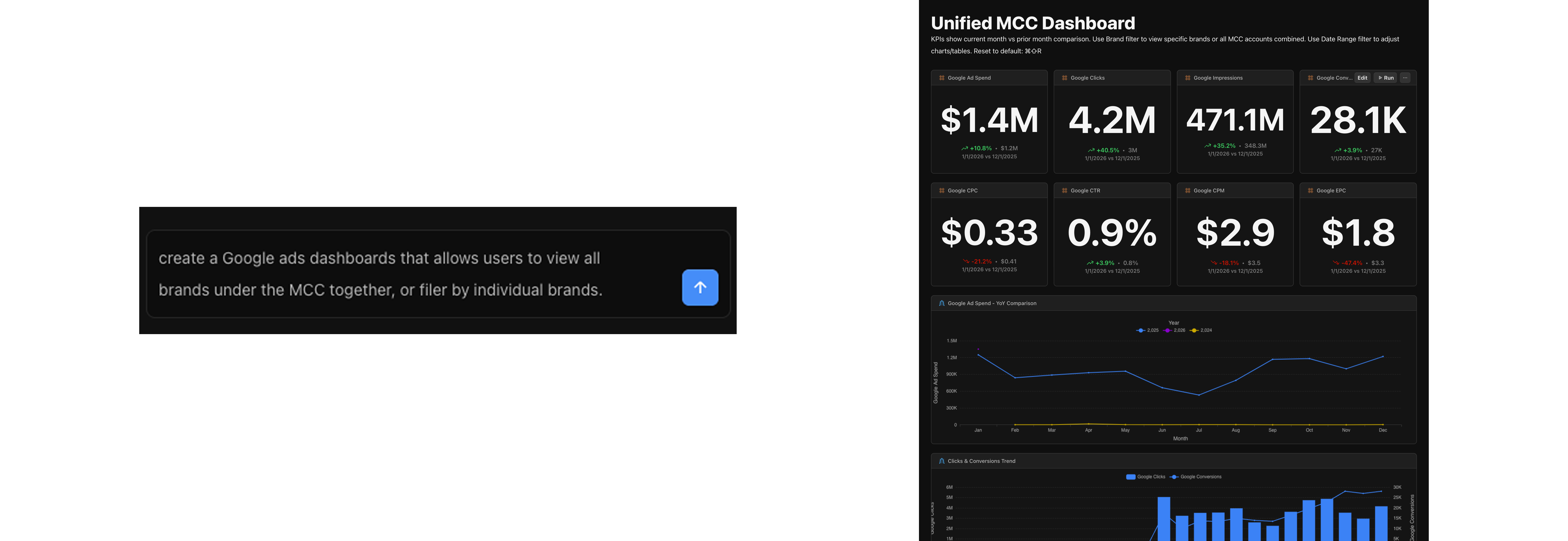
Now you have everything you need:
- Total spend across all brands
- ROAS by brand
- CTR and CPC trends over time
- Brand comparison tables
- Blended view with Shopify revenue
Step 6: Ask Fi
Instead of writing SQL, ask Fi:
- "Which brand has the highest ROAS this month?"
- "Show me spend by brand for the last 30 days"
- "Compare Google Ads spend to Shopify revenue by brand"
Fi understands your semantic model, writes the query, and returns the answer with a chart. No SQL required.
What are your ads actually doing?
Enter your domain and we'll show you the cross-account performance questions your Google Ads data can answer when it's unified.
Try it with any company domain — no signup required.
What You Get
| Component | What It Does |
|---|---|
| Managed Data Warehouse | All MCC accounts sync to DuckLake automatically |
| Semantic Layer | Define metrics once, use everywhere |
| Brand Mapping | Standardize messy account names across sources |
| Unified Dashboard | All brands in one view, blended with Shopify/Stripe |
| AI Queries (Fi) | Ask questions in plain English, no SQL required |
| Scheduled Automation | Daily syncs, automatic refreshes |
Cost Comparison
| Solution | Annual Cost |
|---|---|
| Looker Studio + MCC | Free (no data blending, no multi-currency) |
| Supermetrics + Looker Studio | $3,500-$5,000 |
| AgencyAnalytics | $6,000-$10,000 |
| Funnel.io | $12,000-$73,500 |
| Fivetran + BigQuery + Looker | $15,000-$50,000 |
| Definite | $12,000-$30,000 (full stack + AI) |
Who Is This For?
- Agencies managing 20+ client Google Ads accounts who spend 15+ hours/week on manual reporting
- Holding companies (Thrasio model) with 50-200+ brands under management
- E-commerce operators running multiple storefronts with separate ad accounts
- Performance marketing teams who want to blend Google Ads data with Shopify, Stripe, or HubSpot
If you're tired of managing four separate tools for MCC reporting or paying enterprise prices for basic multi-account analytics, this is worth exploring.
Get Started
Connect your Google Ads MCC, sync all accounts to a managed data warehouse, and build unified dashboards in one platform.
- Start free: definite.app/signup
- Read the docs: docs.definite.app
- Questions? Email hello@definite.app