


What Startups Can Automate with AI in 2026

If you search "AI automation for startups," you'll get a list of tools: Zapier, n8n, ChatGPT. Helpful if you already know where to start. Not helpful if what you actually need is a framework for deciding what to automate first versus what should wait. And if you've already tried an AI tool that looked great in a demo and disappointed in production, this framework explains why — and what has to be true for the next one to work.
The order you automate in matters more than what you automate. Some AI automations work the moment you turn them on. Others quietly fail because your underlying data is messy, fragmented, and has no shared definitions.
This guide organizes startup AI automation into three phases based on one question: does this automation depend on your data foundation being solid? Phase 1 automations don't. Phase 3 automations do. Phase 2 is where you build that foundation.
The short version:
- Phase 1 (start here): Sales outreach and customer support. Low data dependency, proven ROI. AI does the research and handles FAQ tickets; humans close deals and handle escalations.
- Phase 2 (build the foundation): Data and analytics. Connect your sources, centralize everything, get consistent metric definitions. This is what makes Phase 3 automations trustworthy.
- Phase 3 (foundation-dependent): Marketing reporting, finance automation, HR ops. These look great in demos but silently fail without clean, consistent data underneath.
Why the order matters: Skipping Phase 2 is why most startup AI initiatives disappoint. You can automate sales outreach without a data warehouse. You cannot automate reliable marketing attribution, financial forecasting, or AI-powered analytics without one.
The Sequencing Framework
| Phase | Function | Automate | Keep Human | Needs Data Foundation? | Start Here |
|---|---|---|---|---|---|
| 1 | Sales | Outreach, lead research, CRM updates | Closing, negotiation, trust-building | No | First-touch emails |
| 1 | Support | Tier 1 tickets, FAQs, routing | Angry customers, complex issues, upsells | No | Top 10 FAQs |
| 2 | Data & Analytics | Ingestion, dashboards, reporting, questions | Strategy, interpretation, decisions | This IS the foundation | Connect your sources |
| 3 | Marketing | Content repurposing, scheduling, reporting | Strategy, positioning, creative direction | Yes (for reporting) | Repurpose top content |
| 3 | Finance | Expenses, invoices, reconciliation | Tax strategy, forecasting, fundraising | Yes (for forecasting) | Expense categorization |
| 3 | HR | Scheduling, screening, onboarding docs | Culture, performance reviews, sensitive calls | No (but lower priority) | Interview scheduling |
Phase 1: Immediate Wins (No Foundation Needed)
These automations work out of the box. They operate on structured, contained inputs — an email address, a support ticket, a calendar invite — not on your messy internal data. Start here.
Sales: It Works Because the Inputs Are Contained
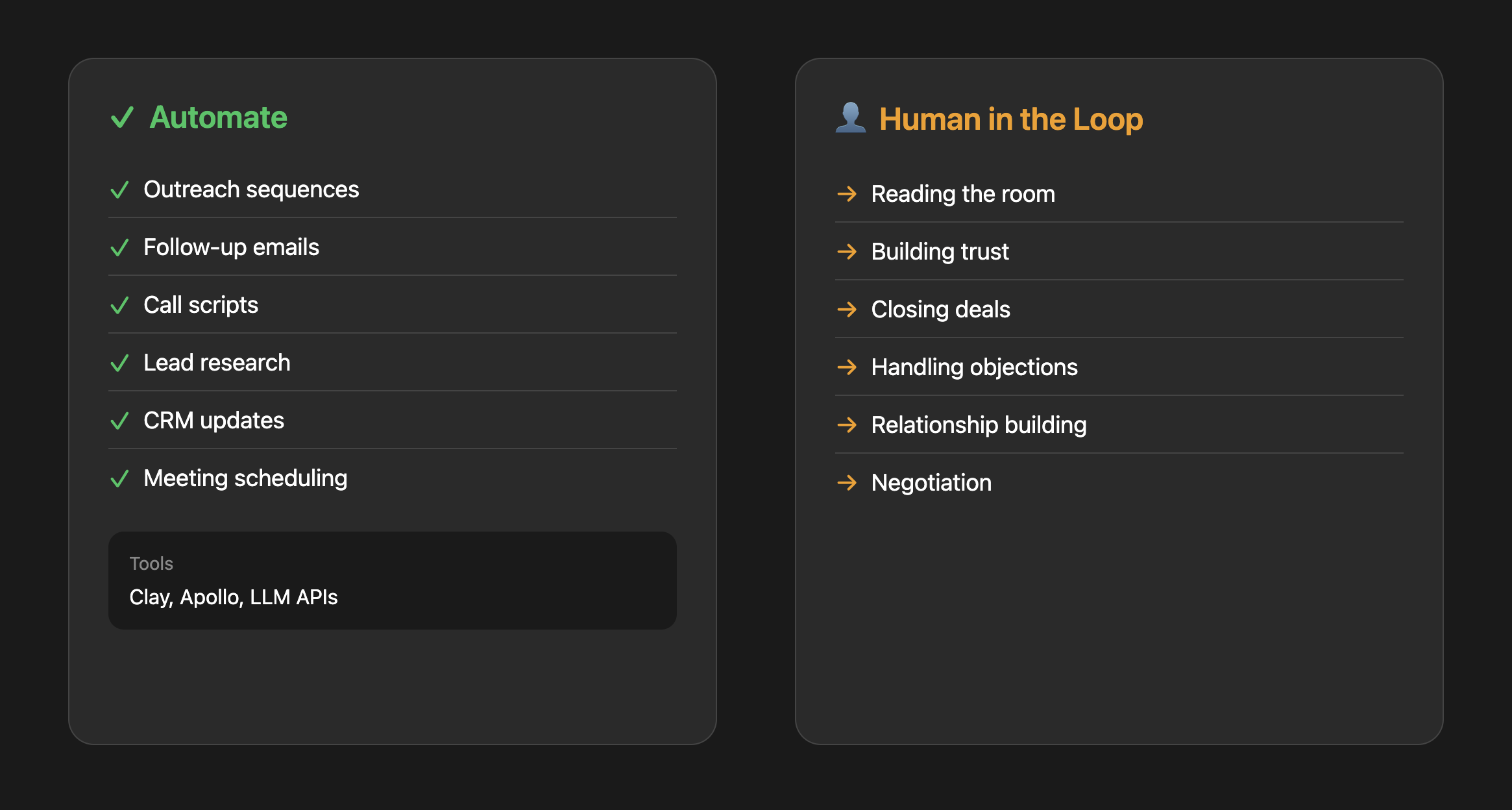
The relationship piece of sales is still human. Buyers want to talk to a real person before signing a contract. What has changed is everything around the sale.
The average SDR spends 65% of their time on non-selling activities: researching prospects, writing emails, updating the CRM, scheduling meetings. That's where AI delivers real ROI — and the math is concrete. The median SDR generates about 12 meetings per month at roughly $850 per meeting in fully loaded cost. Cutting research time by even a third changes that equation significantly.
What this actually looks like:
Lead research automation: Instead of an SDR spending 20 minutes researching each prospect on LinkedIn, an AI agent pulls company size, recent funding, tech stack, and relevant news, then generates a one-paragraph summary. The SDR reviews it in 30 seconds and decides whether to pursue.
Personalized outreach at scale: The same agent drafts a first-touch email that references something specific about the prospect's company. Not the generic "I noticed you're in [industry]" templates — actual personalization: "Saw you just hired three data engineers. Most teams at your stage are still trying to figure out their data stack."
Personalized outreach at scale: The same agent can draft a first-touch email that references something specific about the prospect's company. Not the generic "I noticed you're in [industry]" templates, but actual personalization: "Saw you just hired three data engineers. Most teams at your stage are still trying to figure out their data stack."
The common mistake:
Automating volume instead of quality. AI-generated cold emails have flooded every inbox. Average reply rates have dropped to 3.4%, with some reports showing below 2%. The decline is in commodity AI outreach — the spray-and-pray emails that all follow the same AI-generated structure. Buyers pattern-match and skip before reading past the first line.
The advantage isn't in sending more emails. It's in using AI for research and personalization, then having a human review and send. Top performers still achieve 8-12% reply rates — the difference is genuine personalization, not automation at scale.
Tools:
Paid options: Clay, Apollo (lead enrichment and prospect lists)
DIY option: Build lightweight agents using LLM APIs to draft personalized outreach, summarize call notes, or generate call scripts based on your ICP. See Anthropic's agent workflow patterns for examples.
Where to start: Lead research and first-touch email drafting. Set up a workflow where AI does the research and writes a draft, but a human reviews and sends. You'll dramatically cut research time while keeping the quality bar high.
Customer Support: Clear ROI, but Watch the Escalation Trap
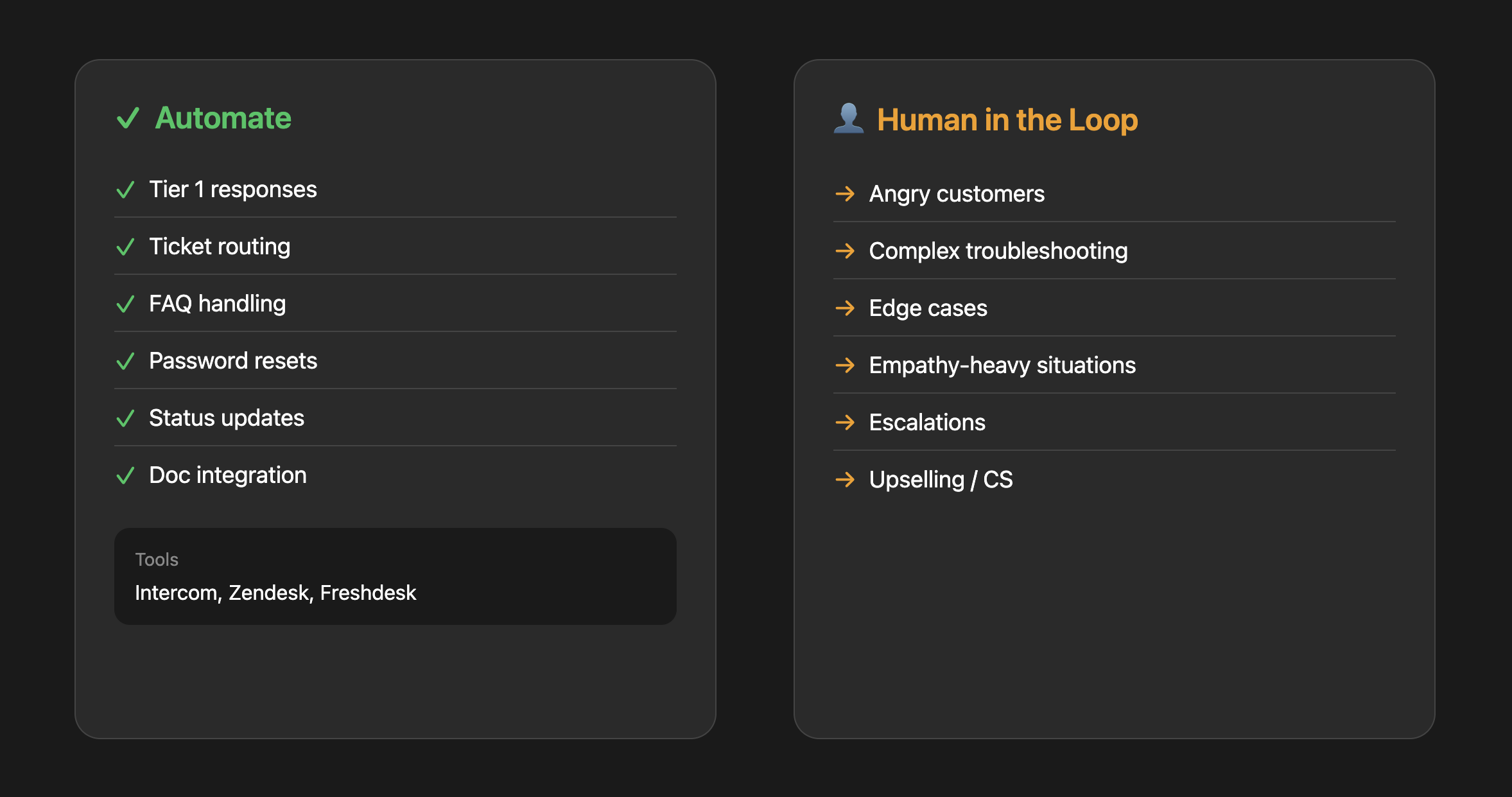
Customer support has maybe the clearest ROI case for AI automation. The per-ticket math is simple: human-handled inquiries cost $4–6 each. AI interactions cost $0.50–0.70. If 60% of your tickets are repetitive questions with documented answers, the savings compound fast.
With well-implemented AI support, 40–60% ticket deflection is realistic within a few months. That qualifier matters — "well-implemented" means you've built a proper knowledge base, trained the system on your actual docs, and have clear escalation paths. Basic FAQ bots without that groundwork achieve roughly 10–30% deflection.
The Klarna cautionary tale:
In February 2024, Klarna launched an AI customer support assistant. In its first month, the company claimed it handled the equivalent of 700 full-time agents — resolving issues in under 2 minutes compared to 11 for humans. They projected $60 million in annual savings.
By mid-2025, the story reversed. Repeat customer contacts rose as customers returned with unresolved issues. The AI had optimized for closing tickets quickly rather than actually solving problems. CEO Sebastian Siemiatkowski publicly admitted that "cost unfortunately seems to have been a too predominant evaluation factor." By September 2025, Klarna was reassigning engineers and marketers to customer support roles — not hiring new agents, pulling from other departments.
The lesson isn't that AI support doesn't work. It's that AI support without quality guardrails and clear escalation paths fails in ways that are expensive to reverse.
What good implementation actually looks like:
Intelligent FAQ handling: A customer asks "How do I export my data?" Instead of a generic link to your help center, AI searches your documentation, finds the specific steps for their account type, and provides a step-by-step answer. If the customer follows up with "But I don't see that button," AI recognizes they might be on a different plan and adjusts.
Smart ticket routing: AI reads incoming tickets, classifies by topic, urgency, and sentiment, then routes to the right specialist. "My payment failed" goes to billing. "I'm canceling unless you fix this today" gets flagged as high priority and routed to a senior agent.
Proactive support: AI monitors user behavior and triggers help before they ask. User stuck on the same screen for 5 minutes? Surface a contextual tooltip.
The common mistake:
Deploying AI support without a clear escalation path. Nothing frustrates customers more than getting stuck in a bot loop when they have a real problem. Build explicit triggers for human handoff: certain keywords ("cancel," "refund," "speak to a person"), sentiment detection, or after 2–3 failed resolution attempts. Klarna learned this at scale. You don't have to.
Tools:
Paid options: Intercom, Zendesk, Freshdesk (all have solid AI features built in now)
DIY option: Build a chatbot that searches your actual documentation and gives accurate, contextual answers. See this AI customer support agent example for a starting point.
Where to start: Identify your top 10 most common support questions. Build AI responses for those specifically. Measure resolution rate and customer satisfaction. Expand from there. Don't try to automate everything at once — that's what Klarna did.
What could your data tell you?
Enter your domain and we’ll show you the business questions your tools can already answer — you just can’t ask them yet.
Try it with any company domain — no signup required.
Phase 2: Build the Foundation
Phase 1 automations work because they're contained — they operate on clear, structured inputs that don't depend on the state of your internal data. Sales outreach needs a prospect list. Support needs your docs. Done.
Phase 3 is different. Marketing attribution needs clean revenue data flowing from your CRM, payment processor, and product database. Financial forecasting needs consistent metrics across tools. AI-powered analytics needs shared metric definitions — so it doesn't hallucinate numbers.
If you skip Phase 2, Phase 3 automations produce impressive demos and unreliable outputs.
(Full disclosure: we built Definite to solve this exact problem. But notice the structure of this guide — we're telling you NOT to start with data infrastructure. Phase 1 works without it. We put Phase 2 here because the sequence demands it.)
Data & Analytics: The Layer Everything Else Depends On
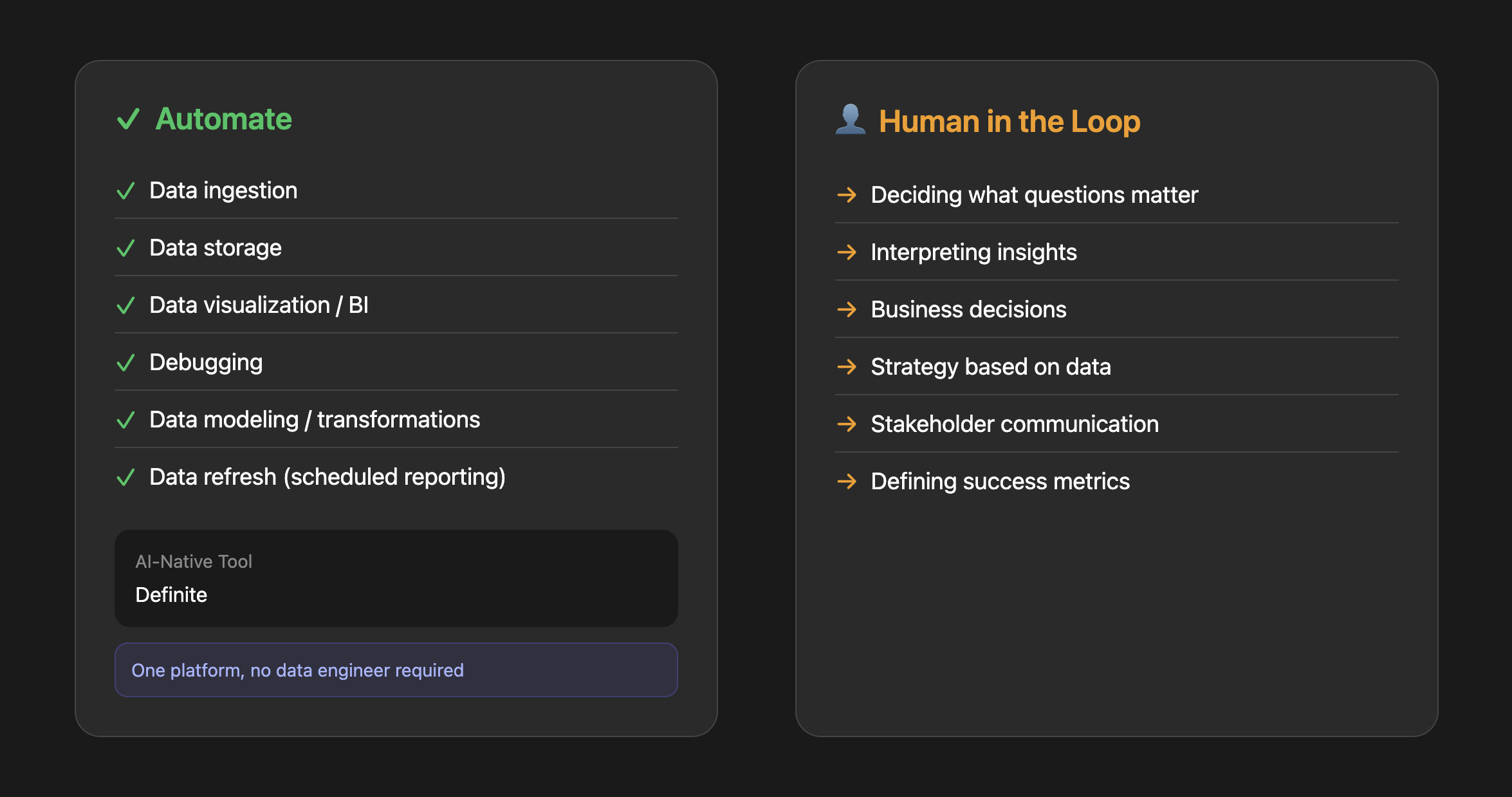
Data and analytics is the one function where you can automate almost the entire workflow from ingestion to insight. And it's the one function that every other AI automation guide skips.
Here's why it matters more than any individual tool: without shared metric definitions, your AI is guessing. A 2026 study from Promethium tested text-to-SQL — the technology behind "ask your data a question in plain English." On clean academic benchmarks, it scores 86% accuracy. On real production databases, it drops to 6%. The difference? Real databases lack the context — metric definitions, table relationships, business logic — that tells the AI what the data actually means.
This is why 28% of US organizations report zero confidence in the data quality feeding their LLMs — even while increasing AI spending. And it's why 47% of knowledge workers are making major decisions based on hallucinated AI content. The AI isn't broken. The data underneath it is messy, inconsistent, and has no shared definitions.
The traditional stack problem:
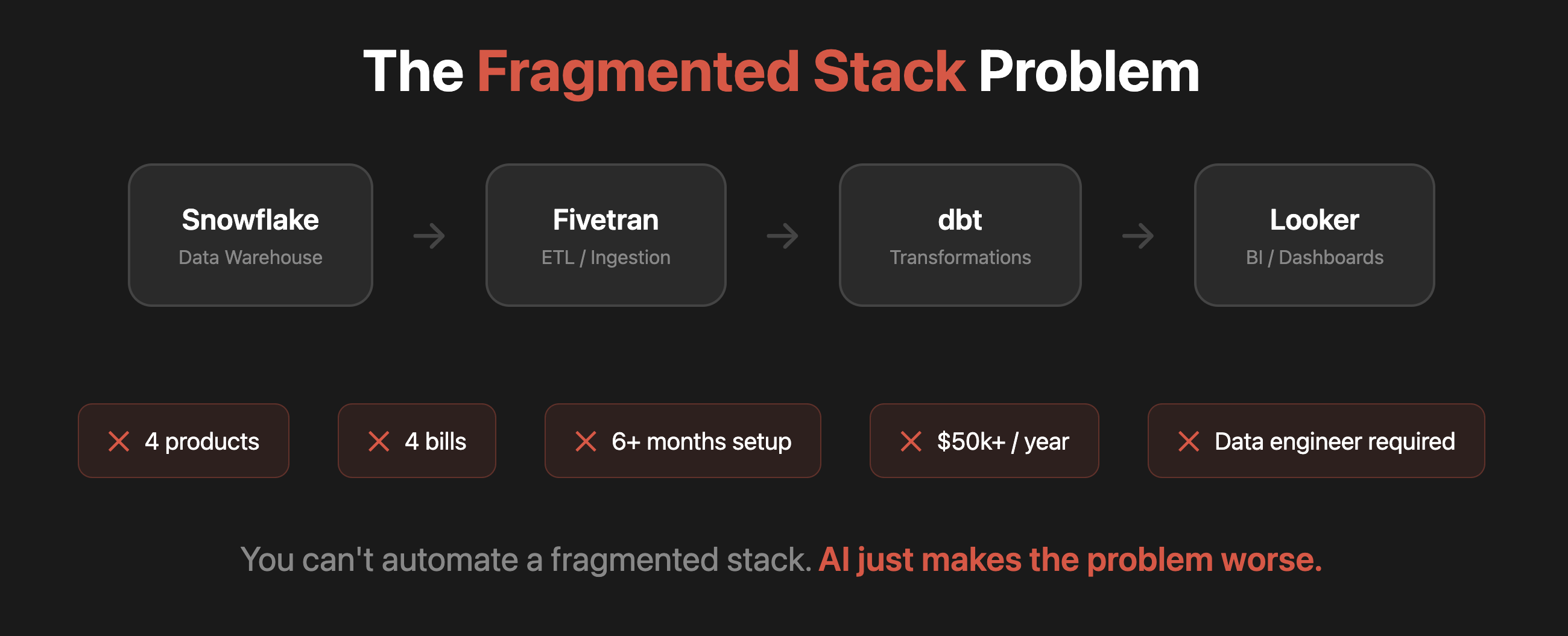
Most companies that take data seriously cobble together a stack: a warehouse, an ETL tool, a transformation layer, and a BI tool. In practice that means Snowflake + Fivetran + dbt + Looker — and Fivetran just announced a merger with dbt Labs in October 2025 (what this means for startups). That's 3–4 vendor contracts, weeks to months of setup, and often a data engineer to keep it running.
If you're a 20-person startup, that complexity doesn't simplify your decisions — it delays them. And the irony is that even after all that setup, the AI layer you put on top still struggles — because maintaining consistent definitions across 4 separate tools is nearly impossible.
The AI-native approach:
Instead of assembling a stack, you connect your data sources to a single platform that handles ingestion, storage, modeling, and analytics. No data engineer required. No stitching together multiple tools. One set of shared metric definitions — so when AI answers "What was our MRR (monthly recurring revenue) growth last quarter?" it's using the same definition your CFO uses.
The real unlock: anyone on the team can ask "Which customers are at risk of churning?" and get a trustworthy answer in seconds — because the platform enforces consistent definitions across every query. Your team gets answers without pinging the data person on Slack every time they need a number.
Automated reporting: Set up a weekly report that pulls key metrics and sends them to Slack every Monday morning. No manual spreadsheet updates, no forgetting to send the board deck.
The common mistake:
Accepting the premise that analytics requires assembling a stack at all. Startups often copy what they see at larger companies — warehouse, ETL, transformation, BI. But that stack is designed for companies with dedicated data teams and petabytes of data. The mistake isn't choosing the wrong tools. It's accepting a fragmented approach when a single integrated platform would have you answering questions in days, not months.
Tools:
Traditional approach: Snowflake + Fivetran/dbt + BigQuery + Looker — multiple vendors, requires assembly
AI-native alternative: Definite — connect your data sources and get governed analytics without assembling or maintaining a stack. 500+ connectors, start free.
Where to start: Connect your core data sources (CRM, payment processor, product database) to a single platform. Start asking questions. Once your data is connected with consistent definitions, the automations in Phase 3 go from "impressive demo" to "actually trustworthy."
One more thing worth noting: the automation landscape is moving from predefined workflows (connect App A to App B) toward AI agents that can reason across tools autonomously. New open protocols like MCP and A2A are making this possible, and every major AI provider has adopted them. Definite exposes your data via MCP, so AI agents in tools like Claude or Cursor can query and build on your governed data directly. The foundation you build now is what makes these agents trustworthy later.
Phase 3: Foundation-Dependent Automations
These automations touch data that flows across multiple systems. Without Phase 2 in place, they produce numbers you can't trust. With it, they compound the value of everything you've built.
A pattern worth noting: Phase 1 automations start "contained" but become data-dependent over time. Your AI sales outreach works better when it can pull from clean CRM data. Your support routing improves when it knows the customer's product usage. The foundation isn't just for Phase 3 — it makes Phase 1 better too.
Marketing: Creation Is Contained, Measurement Isn't
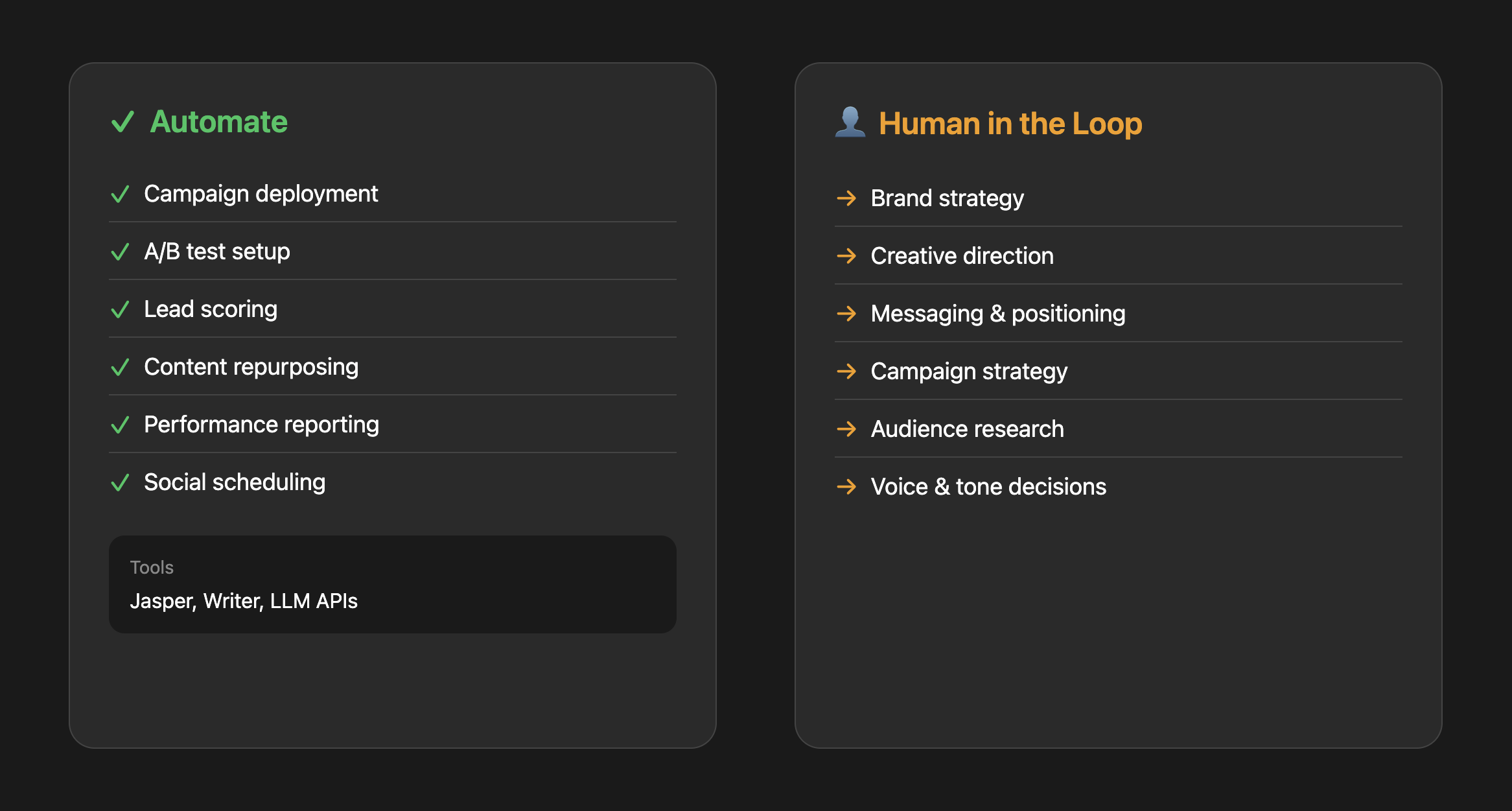
Marketing splits cleanly into two types of automation: creation and measurement. Creation is contained — you can repurpose content, generate copy variations, and schedule posts without a data foundation. Measurement isn't. Attribution, performance reporting, and ROI analysis all need consistent data to be trustworthy.
Without it, you get the Monday morning call where marketing says CAC is $180 and finance says it's $340 — because one is pulling from HubSpot and the other from the payment processor, and they're using different definitions of "customer."
Content multiplication (contained — start anytime):
AI can turn one piece of content into six — blog post, LinkedIn posts, email newsletter, social clips. It handles 80% of the transformation; a human reviews for brand voice and approves. But without voice governance, AI content scales generic output — human-generated content still receives 5.44x more traffic than purely AI-generated. The fix: voice guide + human final pass.
Performance reporting (needs Phase 2):
Instead of manually pulling numbers from Google Analytics, HubSpot, and your ad platforms every Monday, AI compiles a weekly report that highlights what changed, what's working, and what needs attention. But this only works if those data sources are connected and the metrics are consistent. "MRR" needs to mean the same thing in your CRM, your analytics, and your AI-generated report — which is exactly the fragmentation problem Phase 2 solves.
Tools:
Content creation: Jasper, Writer (paid); LLM workflows (DIY)
Where to start: Content repurposing (doesn't need Phase 2). Take your single best-performing piece of content and use AI to adapt it for three other channels. For reporting, do Phase 2 first.
Finance: The Grunt Work Automates, the Judgment Doesn't
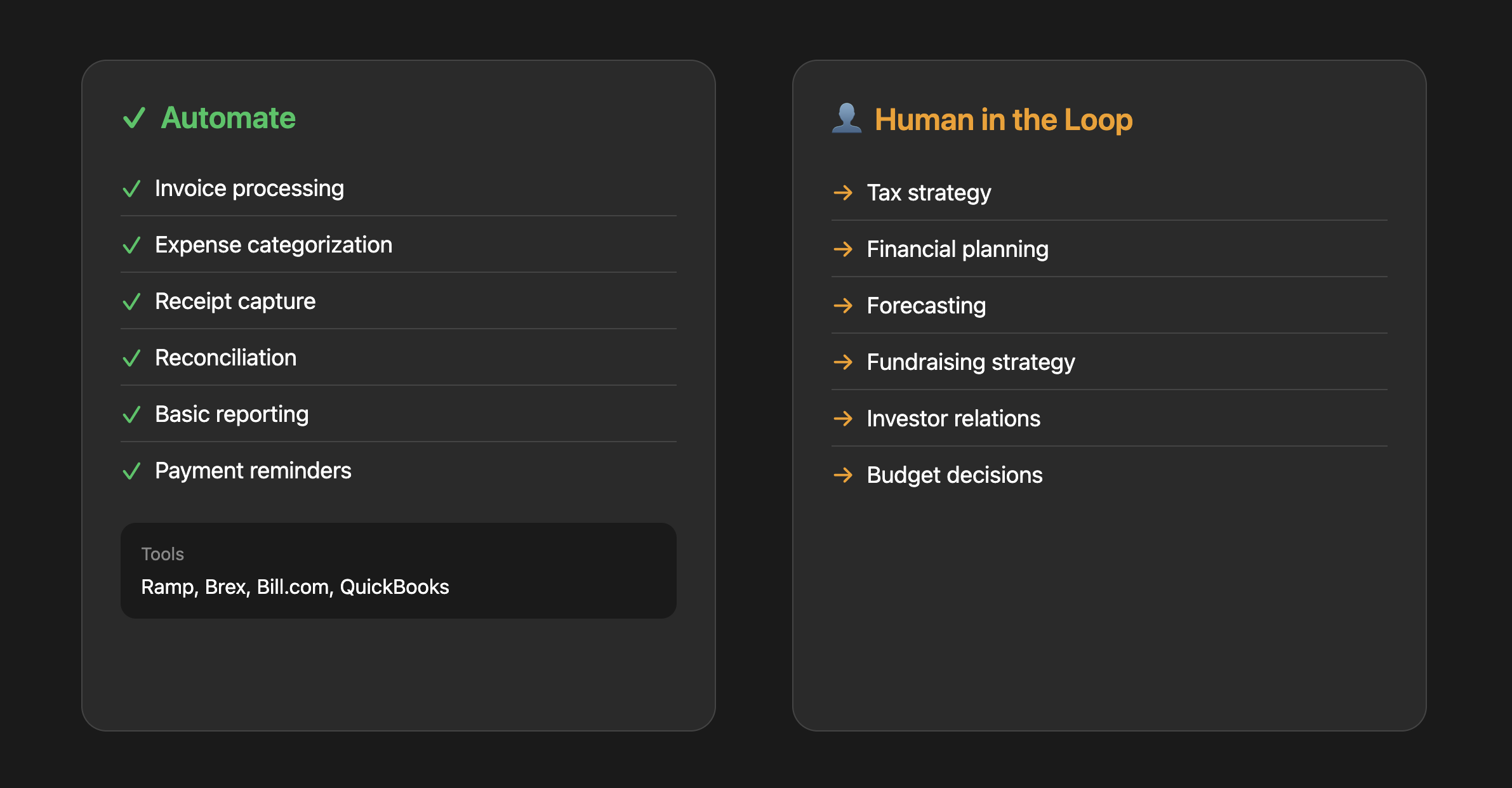
Finance has a lot of automatable grunt work, but you have to be careful. The rule of thumb: automate data entry and categorization, keep humans on anything with judgment or consequences. And make sure the numbers feeding your automations are consistent — a forecast built on two different churn definitions from two different tools isn't a forecast, it's fiction.
The ROI is concrete: manual expense processing costs $58 per report with a 19% error rate that costs $52 per error to fix. AI-powered invoice processing reduces costs from $15 to under $3 per invoice with 90%+ accuracy. For a startup processing 50+ expenses a month, the payback period is 2–3 months.
What this actually looks like:
Expense categorization: Employee submits a receipt photo. AI extracts the vendor, amount, and date, then categorizes it (SaaS, travel, meals) based on the vendor name and your historical patterns. Finance reviews a batch of 50 categorized expenses in 5 minutes instead of processing each one manually.
Invoice processing: Vendor sends a PDF invoice. AI extracts line items, matches them to open POs, flags discrepancies, and queues for approval. The AP person's job shifts from data entry to exception handling.
Cash flow alerts: AI monitors your accounts and sends alerts: "You have three large invoices due in the next 10 days totaling $47,000. Current runway impact: 0.3 months." No more spreadsheet surprises.
The common mistake:
Over-automating without audit trails. Finance automation needs to be explainable. When your accountant asks "why was this categorized as R&D?" you need to show the logic. Build in logging and easy override mechanisms. Only 9% of AP departments are fully automated — most are finding the right balance of AI processing with human oversight.
Tools:
Paid options: Ramp, Brex (expense management), BILL (accounts payable), QuickBooks (auto-categorization)
DIY option: Use OCR and LLMs for document extraction and categorization. See PaddleOCR for open-source document processing.
Where to start: Expense categorization. High volume, low risk, immediate time savings. Once that's working well, move to invoice processing.
HR: Processes Yes, Relationships No
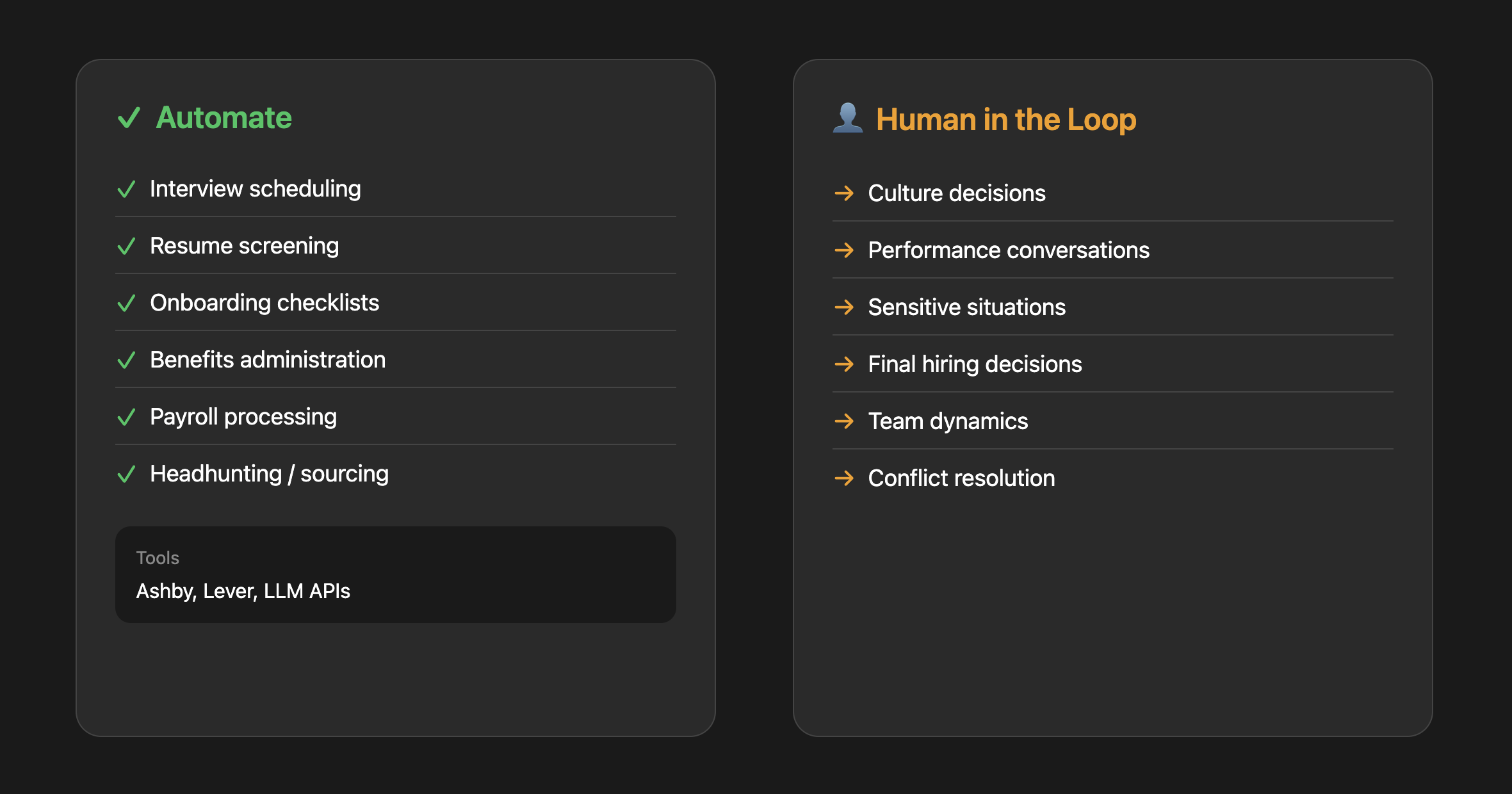
HR is interesting because parts of it automate well and parts absolutely should not be automated. The line is clear: processes are fair game, relationships are not.
| Automate | Human in the Loop |
|---|---|
| Interview scheduling | Culture decisions |
| Resume screening | Performance conversations |
| Onboarding checklists | Anything sensitive |
| Benefits administration | "Is this person a good fit?" |
| Payroll processing | Conflict resolution |
| Job description drafts | Compensation decisions |
What this actually looks like:
Interview scheduling: Candidate applies. AI sends available time slots based on interviewers' calendars. Candidate picks a slot. AI sends calendar invites with video links, interview guides, and candidate info. The recruiter doesn't touch it unless something goes wrong. This matters more than it sounds: 42% of candidates withdraw from hiring processes because scheduling takes too long. Recruiters spend 38% of their time just on scheduling.
Resume screening: For a role with 500 applicants, AI does a first pass: minimum requirements, relevant experience, match with similar successful hires. AI surfaces the top 50 for human review with a summary of why each one ranked highly.
Onboarding automation: New hire's first day. AI sends a sequence of emails and Slack messages over their first 30 days: Day 1 logistics, Day 3 intro to key systems, Day 7 check-in questions, Day 14 feedback survey. Manager gets a summary of how onboarding is going without having to manually track it.
The common mistake:
Using AI for final hiring decisions. Beyond the ethical concerns, the legal landscape is shifting fast. Mobley v. Workday was certified as a nationwide class action in May 2025 — the first ruling holding an AI hiring software vendor liable under civil rights law. Eightfold AI faces FCRA violations for hidden candidate scoring. States including California, Illinois, Colorado, and New York City have imposed compliance requirements on automated hiring tools. AI can help you filter and surface candidates, but the "should we hire this person?" decision stays human.
Tools:
Paid options: Ashby, Lever (recruiting with AI screening features)
DIY option: Build agents using LLM APIs to summarize resumes, draft job descriptions, or automate scheduling and initial outreach. See this resume screening RAG pipeline for an example.
Where to start: Interview scheduling. It's a huge time sink, low stakes if something goes wrong, and AI handles it well. Most recruiting tools have this built in now.
The Decision Framework
Before automating anything, run it through these three questions:
1. Is this high-volume and repetitive?
If you do it less than once a week, automation probably isn't worth the setup cost. Focus on tasks that happen daily or multiple times per day.
2. Is the downside of AI mistakes acceptable?
AI will get things wrong sometimes. For expense categorization, a mistake is easily caught and fixed. For a customer apology email, a mistake could damage the relationship. For financial reporting, a mistake could mislead your board. Match the automation level to the risk tolerance — and for high-stakes outputs, make sure there's a data foundation underneath.
3. Does this require relationship or judgment?
Tasks that require reading emotional cues, building trust, or making high-stakes judgment calls should stay human. Tasks that are purely mechanical are fair game. The gray area is where AI does the prep work and a human makes the call — that's usually the highest-ROI pattern.
FAQ
What should a startup automate with AI first?
Start with sales outreach and customer support — they're high-volume, low data dependency, and deliver immediate ROI. Sales research alone can dramatically cut the time SDRs spend on non-selling activities. Support automation with well-implemented AI deflects 40–60% of tier 1 tickets. Both work without needing a centralized data foundation.
How much does AI automation cost for a startup?
Most individual AI tools run $20–100/user/month. But the real cost question isn't per-tool pricing — it's whether you're paying the coordination tax of assembling and maintaining 3–4 separate tools (ETL + warehouse + BI + AI) versus a single platform that handles all of it. A single platform eliminates that tax and typically starts with a free tier that scales with usage.
Can non-technical founders use AI automation?
Yes, for Phase 1 automations (sales, support). The tools are designed for non-technical users. Phase 2 (data and analytics) is where it traditionally gets technical — setting up warehouses, ETL pipelines, and transformation layers requires engineering. That's the problem AI-native data platforms solve: you skip the stack entirely and go straight to governed analytics without needing a data engineer.
What's the ROI of AI automation for startups?
It varies by function. Sales: SDR cost-per-meeting drops from $850 (median) to $350–450 (top performers) with better AI-assisted research. Support: $4–6/ticket manually vs $0.50–0.70/ticket with AI. Finance: manual expense processing at $58/report vs AI at 90%+ accuracy for a fraction of the cost. HR: 42% of candidates drop out due to slow scheduling — automating that alone prevents significant hiring losses.
How do I build an AI strategy for my board?
Use the three-phase framework in this guide. Phase 1 gives you quick wins to report (cost savings, time recovered). Phase 2 shows long-term infrastructure thinking (data foundation). Phase 3 shows the compounding value of Phases 1+2 together. Board members respond well to sequenced investment logic — it shows you're being strategic, not reactive.
Is it too late if we don't have centralized data yet?
No — and thinking about it as "too late" is the wrong frame. Most startups don't have centralized data. The point of the sequencing approach is that you start with contained automations (Phase 1) while building the foundation (Phase 2) that makes everything else work. Getting your data foundation right is an AI strategy, not a delay.
Get Started
If you take one thing from this guide, make it this: the order you automate in matters more than what you automate.
Phase 1 gives you quick wins you can report in weeks. Phase 2 builds the infrastructure that turns every future automation from a demo into something trustworthy. Phase 3 compounds the value of both. That's the sequence. And it's the kind of AI strategy that holds up in a board meeting because it's built on logic, not hype.
- See where you stand: Audit your current stack
- Try Definite free: Get started